UDN
Search public documentation:
ActorsBrowserReference
日本語訳
中国翻译
한국어
Interested in the Unreal Engine?
Visit the Unreal Technology site.
Looking for jobs and company info?
Check out the Epic games site.
Questions about support via UDN?
Contact the UDN Staff
中国翻译
한국어
Interested in the Unreal Engine?
Visit the Unreal Technology site.
Looking for jobs and company info?
Check out the Epic games site.
Questions about support via UDN?
Contact the UDN Staff
UE3 Home > Unreal Editor and Tools > Actors Browser Reference
Actors Browser Reference
Overview
Opening the Actor Class Browser
Actor Class Browser Interface
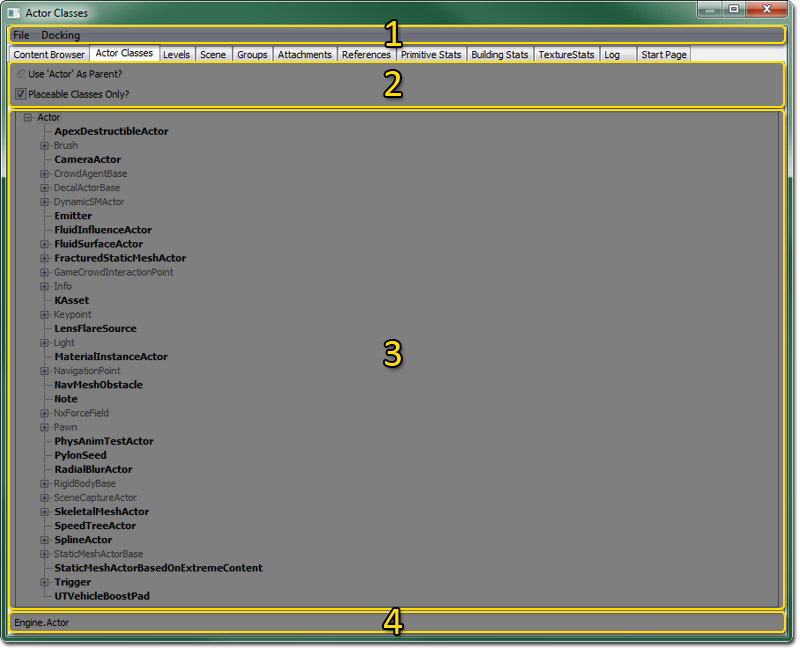
- - Menu Bar
- - Tool Bar
- - Actor Tree
- - Current Class
Menu Bar
File
- Open Package - From here you can open UnrealScript compiled code .u packages.
- Export All Scripts - This option exports all classes to UnrealScript class .uc files which can later be rebuilt.
Docking
- Docked - This option will dock a currently floating browser into the main browser window. When the current browser is docked, this option appears checked.
- Floating - This option will undock a docked browser from the main browser window causing it to become a floating browser in its own window. When the current browser is floating, this option will be checked.
- Clone Browser - This option will create a duplicate of the current browser.
- Remove Browser - This option will remove or delete the current browser. This option is only enabled on cloned browser windows.
Tool Bar
- Use Actor as parent? - With this toggle checked, the Actor tree displayed below will start with "Actor" as the highest level. If not checked, then "Object" will be used as the highest level.
- Placeable classes only? - By checking this toggle, all of the non-placeable classes that do not have placeable classes below them will be pruned from the Actor tree. Placeable Actors are shown in bold in the Actor tree.
Actor Tree
The Actor tree displays all of the Actors available to you. To place an actor in the world, select it in the Actor Tree and then right click in one of the viewports where you want it. Towards the top of the menu that pops up when you right click should be the option: "Add Selected Actor Here" Note that some Actors are in bold while others are not. The Actors in bold are the Actors that you can place, the others are just there for structure in the classes. To expand a branch of the Actor tree, click on the plus sign in a box next to the Actor and it will display all of the actors below it in the tree. To retract a branch of the Actor tree, click on the minus sign in a box next to the Actor and it will hide all of the actors below it in the tree.Context Menu
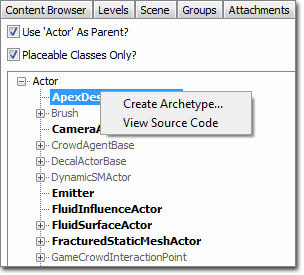 The classes in the Actor Tree can be right-clicked to reveal the context menu. In this menu you will find the following options:
- Create Archetype… - This option will enable you to create a new archetype using the current class as a basis which will then be accessible through the Content Browser for modification.
- View Source Code - This option will open the UnrealScript class for the current class in the default text editor for the operating system. This is a temp file and is simply for quickly viewing the code. No modifications can be made here.