UDN
Search public documentation:
CrowdSystem
日本語訳
中国翻译
한국어
Interested in the Unreal Engine?
Visit the Unreal Technology site.
Looking for jobs and company info?
Check out the Epic games site.
Questions about support via UDN?
Contact the UDN Staff
中国翻译
한국어
Interested in the Unreal Engine?
Visit the Unreal Technology site.
Looking for jobs and company info?
Check out the Epic games site.
Questions about support via UDN?
Contact the UDN Staff
UE3 Home > AI & Navigation > Crowd System
UE3 Home > Level Designer > Crowd System
UE3 Home > Cinematic Artist > Crowd System
UE3 Home > Level Designer > Crowd System
UE3 Home > Cinematic Artist > Crowd System
Crowd System
Overview
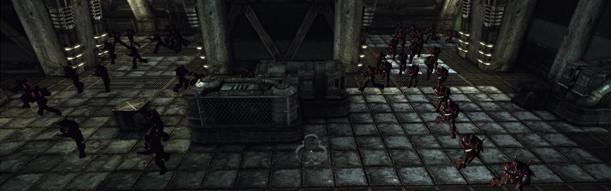 There are currently no crowd-specific rendering optimizations in the engine. Each member of the crowd has a unique AnimTree and skeletal mesh instance. However, the system does avoid the most expensive part of character simulation which is Unreal walking physics and full AI. After walking physics, the next most expensive part of a crowd of meshes is skinning all the graphics vertices, so you should keep the SkeletalMesh used as low-poly and low-bone as possible (we use around 1000-1500 polys and 20 bones). You should probably also make aggressive use of LOD.
How it works
Crowd population manager toggle Kismet sequence action
Input Links
- Start - Enable the population manager. Update its properties based on the editable properties of this toggle action.
- Stop - Disable the population manager.
Specifying agents to spawn
A population manager can spawn multiple types of agents with varying frequencies for each agent type. The set of agent types to spawn is specified by a GameCrowd_ListOfAgents archetype, allowing the list to be easily re-used by different spawners or population managers. Within this list, the agent types are specified using archetypes, as described in the Agent Archetype section. The spawn frequency of each archetype is affected by the associated FrequencyModifier. The likelihood of a specific archetype being chosen is equal to his FrequencyModifier divided by the sum of all the FrequencyModifiers. If an agent archetype entry has GroupMembers specified, agents based on these archetypes will be spawned and grouped with the primary agent. Grouped agents will move together, but will not queue (so destinations they use must have room for the entire group).- CrowdAgentList - List of archetypes of agents spawned by this population manager.
- bClearOldArchetypes - If true, clear old population manager archetype list rather than adding to it with this toggle action's CrowdAgentList.
Spawning
You spawn agents in a similar manner to a particle system, but you specify the location to spawn agents using one or more actors in the level. These are normally GameCrowdDestinations, but can be any type of actor (must be GameCrowdDestination for agent to move between destinations).- SpawnRate - How many agents per second will be spawned.
- MaxAgents - The maximum number of agents alive at one time. If agents are destroyed, more will spawn to meet this number.
- WarmupPct - Percentage of max population to immediately spawn when the population manager is toggled on (without respecting visibility checks). Range is 0.0 to 1.0.
- bKillAgentsInstantly - If true, destroy all crowd agents instantly when the population manager is disabled, instead of letting them die off slowly as they lose relevance.
- MaxSimulationDistance - Max distance from camera relevant for population simulation.
Graphics and animation
Crowd agents use the standard UE3 animation system. They use a LightEnvironment for lighting (like Pawns), but by default do not cast dynamic shadows for speed unless overridden by the crowd spawner. The mesh and animations used by agents are defined by their archetype, as described later.- bEnableCrowdLightEnvironment - Whether to enable the light environment on crowd members.
- bCastShadows - Whether crowd members should cast shadows.
Crowd Spawner Kismet Action
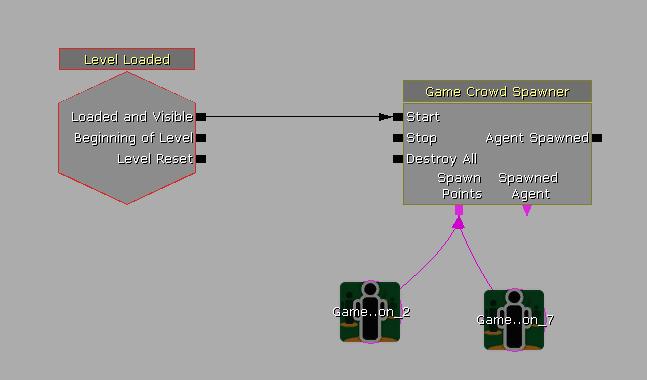
Input Links
- Start - Start crowd agents being spawned.
- Stop - Stop spawning new agents.
- Destroy All - Destroy all agents which have been spawned by this action. (will not play death animations)
- Spawn Points - Where agents will be spawned. Normally a GameCrowdDestination, but can be any actor (must be GameCrowdDestination for agent to move between destinations).
Output Links
- Agent Spawned - Triggered when an agent is spawned.
- Spawned Agent - Outputs the last spawned agent.
Specifying Agents to spawn
A crowd spawner can spawn multiple types of agents with varying frequencies for each agent type. The set of agent types to spawn is specified by a GameCrowd_ListOfAgents archetype, allowing the list to be easily re-used by different spawners or population managers. Within this list, the agent types are specified using archetypes, as described in the Agent Archetype section. The spawn frequency of each archetype is affected by the associated FrequencyModifier. The likelihood of a specific archetype being chosen is equal to his FrequencyModifier divided by the sum of all the FrequencyModifiers. If an agent archetype entry has GroupMembers specified, agents based on these archetypes will be spawned and grouped with the primary agent. Grouped agents will move together, but will not queue (so destinations they use must have room for the entire group).- CrowdAgentList - List of archetypes of agents spawned by this crowd spawner.
Graphics And Animation
Crowd agents use the standard UE3 animation system. They use a LightEnvironment for lighting (like player Pawns), but by default do not cast dynamic shadows for speed unless overridden by the crowd spawner. The mesh and animations used by agents are defined by their archetype, as described later.- AgentLightingChannel - Lighting channels to put the agents in.
- bEnableCrowdLightEnvironment - Whether to enable the light environment on crowd members.
- bCastShadows - Whether crowd members should cast shadows.
Spawning
You spawn agents in a similar manner to a particle system, but you specify the location to spawn agents using one or more actors in the level. These are normally GameCrowdDestinations, but can be any type of actor (must be GameCrowdDestination for agent to move between destinations).- SpawnRate - How many agents per second will be spawned at the target actor(s).
- SpawnNum - The maximum number of agents alive at one time. If agents are destroyed, more will spawn to meet this number.
- SpawnRadius - Radius around target actor(s) to spawn agents.
- bOnlySpawnHidden - If true, only spawn agents if player can't see spawn point.
- AgentWarmupTime - Average time to "warm up" spawned agents before letting them sleep if not rendered.
- bRespawnDeadAgents - If true, agents that are totally removed (ie blown up) are respawned.
- SplitScreenNumReduction - How much to reduce number by in splitscreen.
- bCycleSpawnLocs - If true, the spawner will cycle through the spawn locations instead of spawning from a randomly chosen one.
- bWarmupPosition - If true, agent will try to find an starting position at a random spot between the initial spawn position and its initial destination that isn't in the player's line of sight.
Move To Destination
Newly spawned agents will pick a GameCrowdDestination to move toward. This destination will chosen from the destination list in the GameCrowdDestination used as a spawn location, or from among the GameCrowdDestinations attached to the Destinations input of the crowd spawner. The crowd spawner can also override the agent archetype's base settings to force (more expensive) navigation mesh path finding and obstacle blocking to be used. Note: Obstacle blocking currently has some issues, so its use is not recommended at this time. Without obstacle blocking, you may occasionally see agents pass through walls or fall off ledges even when using path finding.
- bForceObstacleChecking - If true, force obstacle checking for all agents from this spawner.
- bForceNavMeshPathing - If true, force nav mesh navigation for all agents from this spawner.
GameCrowdAgent
Graphics And Animation
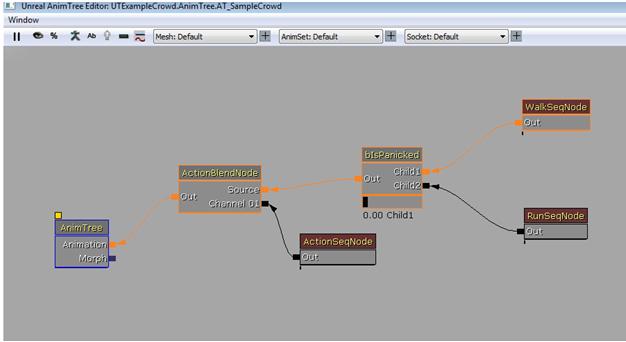
The visual properties of agents are specified by their archetype. Typical crowd members will used skeletal animated meshes with an archetype based on a GameCrowdAgentSkeletal subclass.- SkeletalMeshComponent - SkeletalMeshComponent used for crowd member mesh. The mesh, AnimTree template, and animation sets used by the agent will need to be set.
- WalkAnimNames - The names of the animation loops to use when moving slowly.
- RunAnimNames - The name of the animations to use when moving more quickly.
- MeshMinScale3D, MeshMaxScale3D - Range of 3D drawscales to apply to the agent mesh.
- AmbientSoundCue - Ambient Sound cue played by this agent.
- SpeedBlendStart - Below this speed, the walking animation is used.
- SpeedBlendEnd - Above this speed, the running animation is used. Between this and SpeedBlendStart the animations are blended.
- AnimVelRate - This controls how the animation playback rate changes based on the speed of the agent.
- MaxSpeedBlendChangeSpeed - Limits how quickly blending between running and walking can happen.
- MoveSyncGroupName - Name of sync group for movement, whose rate is scaled.
Agent attachments
Agent archetypes can also be specified to spawn with random attachments specified in the Attachments array.- Attachments - List of sets of meshes to attach to agent.
- SocketName - Name of socket to attach mesh to.
- List - List of possible meshes to attach to this socket.
- StaticMesh - Mesh to attach.
- Chance - Chance of choosing this attachment.
- Scale3D - Scaling applied to mesh when attached.
- List - List of possible meshes to attach to this socket.
- SocketName - Name of socket to attach mesh to.
Movement
Here are the rules that a crowd agent will follow, with the settings within the agent archetype that relates to each. Each rule generates a force that is applied to the agent. The current agent movement system treats agents as particles moving in a flock. In the future, agent movement may move to a system using reciprocal velocity obstacles (http://gamma.cs.unc.edu/RVO/icra2008.pdf).Obstacle avoidance
Agents do not perform normal collision checking, and therefore may pass through level geometry. There is an option for agents to perform obstacle checking using the navigation mesh, which will prevent agents from penetrating geometry or falling off ledges. Even without obstacle checking, agents will typically behave well if they are using navigation mesh pathing.- bCheckForObstacles - Whether to have obstacle mesh block agents.
Velocity clamping
Using root motion velocity will provide the best visual results. It requires the animations to have root motion in them. With this option, the agent's movement will generally match its animation, except in some cases where the agent must move more slowly because of obstacles or sharp turns.- bUseRootMotionVelocity - If true, clamp velocity based on root motion in movement animations.
- bClampMovementSpeed - Whether to clamp movement speed.
- MaxWalkingSpeed - Max walking speed (if not using root motion velocity).
- MaxRunningSpeed - Max running speed (if not using root motion velocity).
- VelocityDamping - A force is applied to limit the maximum speed of an agent. Think of this as 'friction'.
Avoid neighbouring agents
Agents avoid both neighboring agents and pawns. Currently, a simple spring force is used to avoid penetration between agents. Players using a GamePlayerController derived player controller with bWarnCrowdMembers set to true will update crowd members with their position every tick for more accurate avoidance by agents.- AwareRadius - Controls how far around an agent the system looks when finding the average speed.
- AvoidOtherStrength - How hard agents are pushed apart when they overlap.
- AvoidPlayerStrength - How hard agents are pushed away from player.
- AvoidOtherRadius - The radius used to check overlap between agents (basically how big an agent is).
- AwareUpdateInterval - Every how many frames the agents 'awareness' is updated (attractors and other agents).
Move at speed of neighbors
Agents try and move with the average speed of the agents around them.- MatchVelStrength - How aggressively an agent matches the speed of its neighbors.
Stay in Group
Agents which are grouped (see GroupMembers in SeqAct_GameCrowdSpawner) will attempt to stay together, both with the following properties, and through the GroupWaitingBehaviors (see Custom Agent Behavior).- GroupAttractionStrength - How hard group members are pulled together when beyond DesiredGroupRadius.
- DesiredGroupRadius - Try to keep group members this close together.
Agent path finding
Because crowd agents do not do collision checks against the level like players do, they rely on the path finding using the navigation mesh to avoid passing through level geometry. Path finding has some performance cost, so for agents that are only traveling between destinations they can reach directly, it will be more efficient to disable path finding.- bUseNavMeshPathing - If true, use navmesh for pathing.
- FollowPathStrength - Agent acceleration along the path direction (towards their target).
Agent Rotation
The following properties control agent rotation while traveling.- MaxYawRate - Crowd agents rotate to face the direction they are traveling. This value limits how quickly they turn to do this, to avoid them spinning too quickly.
- bAllowPitching - Whether agent is allowed to pitch as he rotates toward his current travel direction.
- RotateToTargetSpeed - This controls how fast an agent will turn to face its target.
- MaxTargetAcquireTime - Maximum time to try to rotate toward a target before playing animation.
Conforming To Ground
As mentioned earlier, agents can optionally conform to uneven surfaces using a vertical zero-extent line check. Note that this approach has no concept of 'max step height' and will not correctly handle very steep or vertical surfaces. By default, agents will conform to the surface of the navmesh. For certain special cases, they can be made to conform to world geometry instead.- ConformType - How agent conforms to surfaces.
- GroundOffset - Distance from ground to agent center (used to adjust foot positioning).
- ConformTraceDist - How far to trace to conform agent to the world geometry.
- ConformTraceInterval - Every how many frames the 'conform' line check is done.
Crowd Simulation Level of Detail (LOD)
Separately from visual LOD, crowd agents adjust their simulation based on distance from the player and visibility. Currently six properties are exposed to allow simulation LOD tweaking for agent archetypes.- NotVisibleLifeSpan - How long to wait before killing this agent when it isn't visible.
- NotVisibleTickScalingFactor - Scaling factor for agent ticking when not visible.
- ProximityLODDist - Distance to LOD out proximity checks for non-visible agents.
- VisibleProximityLODDist - Distance to LOD out proximity checks for visible agents.
- MaxAnimationDistance - Maximum distance from camera at which this agent should be animated
- MaxLOSLifeDistance - Max distance to keep agents around if they haven't been rendered in NotVisibleLifeSpan, but are still in player's potential line of sight.
Custom agent behavior
The default agent behavior is to move between GameCrowdDestinations. This default behavior can be overridden using the "plug-in" behavior system. Designers can assign behaviors to trigger based on various game events by creating Behavior Archetypes based on the GameCrowdAgentBehavior class (note that this is an Object sub-class, so uncheck "Actor classes only" in the class browser to find it). Several basic behavior classes are implemented in the base crowd system, and additional game specific behaviors can be created for a game project. These behaviors can then be customized by designers in the behavior archetypes. See the GameCrowdAgentBehavior entry below for more details. When an agent behavior completes or is stopped and no other behavior is assigned to the agent, the agent will return to the default behavior of moving between GameCrowdDestinations. Behavior archetypes are assigned to agent archetype BehaviorEntry arrays, or to the GameCrowdDestination ReachedBehavior BehaviorEntry array. When the appropriate game event is triggered, the agent will be assigned a behavior from the list of possible behaviors for that event. Each BehaviorEntry has the following editable properties:- BehaviorArchetype - Archetype based on a GameCrowdAgentBehavior class.
- BehaviorFrequency - How often this behavior is picked = BehaviorFrequency/(sum of BehaviorFrequencies).
- bNeverRepeat - If true, agent will never repeat this behavior.
- EncounterAgentBehaviors - Behaviors to choose from when encounter another agent (only if no current behavior). These behaviors are triggered when an agent encounters (within its AwareRadius) another agent, with both facing each other.
- GroupWaitingBehaviors - Behaviors to choose from when waiting for other group members.
- SeePlayerBehaviors - Behaviors to choose from when see player.
- SeePlayerInterval - How often see player event can be triggered. If 0, never retriggers.
- SpawnBehaviors - Behaviors to choose from when agent spawns.
- PanicBehaviors - Behaviors to choose from when agent panics.
- RandomBehaviors - Behaviors to choose from randomly at RandomBehaviorInterval.
- RandomBehaviorInterval - Average time between random behavior attempt (only if visible to player and no current behavior).
- Health - How much damage agent can sustain before dying.
- DeathAnimNames - Set of possible animation names to play when agent dies.
- DeadBodyDuration - How long dead body stays around.
- bPreferVisibleDestination - If true, agent will prefer destinations with line of sight to player if starting from non-L.O.S. destination.
- bPreferVisibleDestinationOnSpawn - If true, prefer visible destination for first destination chosen after spawn.
Debugging agent behavior
Assuming your game's PlayerController class is derived from GamePlayerController, the console command 'CrowdDebug 1' will turn on the display of agent information over nearby agents' heads. The console command 'ShowGameDebug' will display stats information about the crowd population manager, and 'stat crowd' will display crowd system performance statistics.Killing agents
You can use any pain-causing volume to destroy crowd agents, or a GameCrowdDestination can be set to destroy agents which reach it. When killed, a GameCrowdAgentSkeletal will play an animation from its DeathAnimNames array. GameCrowdAgents can also be damaged, and will die when their health becomes less than zero. To allow weapon collision they use the bEnableLineCheckWithBounds option, which performs line checks against the bounding box of the mesh. This is very approximate, but avoids the cost of an additional CylinderComponent, or doing more expensive per-bone hit tests.GameCrowdAgentBehavior
- bIdleBehavior - If true, agent should idle (not move between destinations).
- MaxPlayerDistance - Agent must be within this distance of the player to perform this behavior.
- bFaceActionTargetFirst - If true, must face action target before starting behavior.
- bIsViralBehavior - If true, pass on to agents encountered.
GameCrowdBehavior_PlayAnimation
- AnimationList - List of animations to play.
- BlendInTime - Time to blend into next animation.
- BlendOutTime - Time to blend out of animation.
- bUseRootMotion - Whether to use root motion.
- bLookAtPlayer - If true, face player before starting animation.
- bLooping - If true, loop the animation in the list specified by LoopIndex.
- LoopIndex - Which animation to loop in AnimationList if bLooping is true.
- LoopTime - How long to loop the animation if bLooping is true, -1.0 == infinite.
- bBlendBetweenAnims - Whether should blend between animations in the list. Set true if they don't match at start/end.
GameCrowdBehavior_RunFromPanic
This is a very simplistic implementation which causes agents to run from the source of their panic, virally infecting other agents they encountered. Intended as an example implementation for this type of functionality.GameCrowdBehavior_WaitInQueue
This behavior is not exposed for level designer use, as it is tied to destinations which have queue points.GameCrowdBehavior_WaitForGroup
This simple behavior is intended as a basis for an archetype to be added to an agent's GroupWaitingBehaviors. Agents using this behavior will idle and turn toward the agent for whom they are waiting, until he gets close enough.GameCrowdInteractionPoint
- bIsEnabled - If this interaction point is currently enabled.
GameCrowdDestination
GameCrowdDestinations functions as destinations for crowd agents, and also can implement customized behavior for agents which reach the destination. GameCrowdDestinations selected in the editor will display lines to connected destinations (in the NextDestinations list). Selecting multiple GameCrowdDestinations and hitting ctrl-shift-L will connect them (adding themselves to each other's NextDestinations array). Selecting multiple GameCrowdDestinations and hitting ctrl-shift-U will disconnect them.- bKillWhenReached - If true, kill crowd members when they reach this destination.
- NextDestinations - Randomly pick from this list of active destinations for agent's next destination.
- bAllowAsPreviousDestination - Whether agents previous destination can be used as a destination if in list of NextDestinations.
- Capacity - How many agents can simultaneously have this as a destination.
- QueueHead - First position in queue for agents to wait if destination has limited capacity. See below for editor short cut for setting this value.
- Frequency - The likelihood of agents to select this destination from list at previous destination.
- bAvoidWhenPanicked - Don't go to this destination if panicked.
- bFleeDestination - Always run toward this destination.
- bSkipBehaviorIfPanicked - Don't perform kismet or custom behavior at this destination if panicked.
- bMustReachExactly - Must reach this destination's center exactly - will force movement when close.
- bSoftPerimeter - Whether agent should stop on reach edge of destination radius (if not reach exactly), or have a "soft" perimeter.
- InteractionTag - Type of interaction.
- InteractionDelay - Time before an agent is allowed to attempt this sort of interaction again.
- ReachedBehaviors - Agents reaching this destination will pick a behavior from this list.
- SupportedAgentClasses - If set, only agents of this class can use this destination.
- SupportedArchetypes - If set, agents from this archetype can use this destination.
- RestrictedAgentClasses - If set, agents of this class cannot use this destination.
- RestrictedArchetypes - If set, agents from this archetype cannot use this destination.
- bLineSpawner - Spawn in a line rather than in a circle.
- SpawnRadius - Radius around spawn points location in which to spawn agents.
- bSpawnAtEdge - Whether to spawn agents only at the edge of the circle, or at any point within the circle.
- bAllowsSpawning - Whether spawning is at all permitted at this destination.
GameCrowdInteractionDestination
GameCrowdInteractionDestinations don't have any unique functionality. They are simply a GameCrowdDestination subclass with the settings typically needed for a custom interaction destination, such as a capacity of one and being ignored by panicked agents.GameCrowdDestinationQueuePoint
GameCrowdDestinationQueuePoints are used to allow agents to queue at destinations with a limited capacity.- NextQueuePosition - Queue position behind this one in the line. See below for editor short cut for setting.
- AverageReactionTime - Average pause time before agent reacts to queue movement.
SeqEvent_CrowdAgentReachedDestination
SeqAct_PlayAgentAnimation
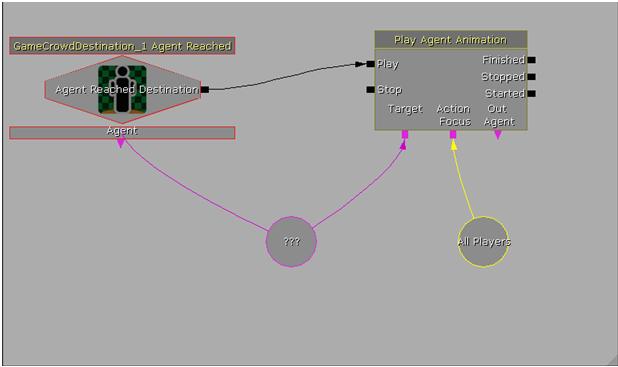 The play agent animation action has the following inputs.
- Play - Starts the animation being played.
- Stop - Stops the current animation.
- Target - The agent on whom this action is being called.
- Action Focus - The actor the agent should face while performing this action.
- Finished - Event when the action completes.
- Stopped - Event when the action is stopped.
- Started - Event when the action is started.
- Out Agent - The agent that was performing this action most recently.
- AnimationList - List of animations to play while at this node.
- BlendInTime - Time to blend into next animation.
- BlendOutTime - Time to blend out of animation.
- bUseRootMotion - Whether to use root motion.
- bFaceActionTargetFirst - If true, face action target before starting animation.
- bLooping - If true, loop the animation in the list specified by LoopIndex.
- LoopIndex - Which animation to loop in AnimationList if bLooping is true.
- LoopTime - How long to loop the animation if bLooping is true, -1.0 == infinite.
- bBlendBetweenAnims - Whether should blend between animations in the list. Set true if they don't match at start/end.
Downloads
- Download the example map.