UDN
Search public documentation:
DevelopmentKitGemsCreatingAMouseInterface
日本語訳
中国翻译
한국어
Interested in the Unreal Engine?
Visit the Unreal Technology site.
Looking for jobs and company info?
Check out the Epic games site.
Questions about support via UDN?
Contact the UDN Staff
中国翻译
한국어
Interested in the Unreal Engine?
Visit the Unreal Technology site.
Looking for jobs and company info?
Check out the Epic games site.
Questions about support via UDN?
Contact the UDN Staff
UE3 Home > Unreal Development Kit Gems > Creating a mouse interface
UE3 Home > User Interfaces & HUDs > Creating a mouse interface
UE3 Home > User Interfaces & HUDs > Creating a mouse interface
Creating a mouse interface
Last tested against UDK Apr, 2011
PC compatible
Overview
Getting a cursor on the screen
Unrealscript
It is possible to create your own mouse positioning code. This is done by adding a custom player input which polls aMouseX and aMouseY to see if there has been any changes. If there has been a change, it is appended to the MousePosition variable and then clamped to keep the mouse cursor within the screen bounds. This is the new game info. It is a simple GameInfo which defines the HUD class and PlayerController class to use.
class MouseInterfaceGameInfo extends GameInfo;

defaultproperties
{
  // Set the HUD type to the mouse interface HUD
  HUDType=class'MouseInterfaceHUD'
  // Set the player controller to the mouse interface Player Controller
  PlayerControllerClass=class'MouseInterfacePlayerController'
}
class MouseInterfaceHUD extends HUD;

// The texture which represents the cursor on the screen
var const Texture2D CursorTexture;
// The color of the cursor
var const Color CursorColor;

event PostRender()
{
  local MouseInterfacePlayerInput MouseInterfacePlayerInput;

  // Ensure that we have a valid PlayerOwner and CursorTexture
  if (PlayerOwner != None && CursorTexture != None)
  {
    // Cast to get the MouseInterfacePlayerInput
    MouseInterfacePlayerInput = MouseInterfacePlayerInput(PlayerOwner.PlayerInput);

    if (MouseInterfacePlayerInput != None)
    {
      // Set the canvas position to the mouse position
      Canvas.SetPos(MouseInterfacePlayerInput.MousePosition.X, MouseInterfacePlayerInput.MousePosition.Y);
      // Set the cursor color
      Canvas.DrawColor = CursorColor;
      // Draw the texture on the screen
      Canvas.DrawTile(CursorTexture, CursorTexture.SizeX, CursorTexture.SizeY, 0.f, 0.f, CursorTexture.SizeX, CursorTexture.SizeY,, true);
    }
  }

  Super.PostRender();
}

defaultproperties
{
  CursorColor=(R=255,G=255,B=255,A=255)
  CursorTexture=Texture2D'EngineResources.Cursors.Arrow'
}
- When PostRender is executed we get the new PlayerInput from the PlayerOwner, which is a PlayerController.
- If we have our new PlayerInput, we then set the Canvas position to the MousePosition stored inside our new PlayerInput.
- We then set the color to the cursor color defined in the default properties.
- Finally, we draw the texture which represents the mouse cursor.
class MouseInterfacePlayerController extends PlayerController;

// Null this function
function UpdateRotation(float DeltaTime);

defaultproperties
{
  // Set the input class to the mouse interface player input
  InputClass=class'MouseInterfacePlayerInput'
}
class MouseInterfacePlayerInput extends PlayerInput;

// Stored mouse position. Set to private write as we don't want other classes to modify it, but still allow other classes to access it.
var PrivateWrite IntPoint MousePosition;

event PlayerInput(float DeltaTime)
{
  // Handle mouse
  // Ensure we have a valid HUD
  if (myHUD != None)
  {
    // Add the aMouseX to the mouse position and clamp it within the viewport width
    MousePosition.X = Clamp(MousePosition.X + aMouseX, 0, myHUD.SizeX);
    // Add the aMouseY to the mouse position and clamp it within the viewport height
    MousePosition.Y = Clamp(MousePosition.Y - aMouseY, 0, myHUD.SizeY);
  }

  Super.PlayerInput(DeltaTime);
}

defaultproperties
{
}
- When PlayerInput is executed, we handle adjust the mouse position.
- The HUD is required to clamp the mouse position within the viewport. As the PlayerInput is an object within the PlayerController, we can access the variable within the PlayerController directly.
- Using aMouseX and aMouseY which is bound within the input config, we add those values to our MousePosition variable. We have to inverse the vertical calculations to produce the right results.
- By clamping the results, we make sure that the mouse position always stays within the viewport.
ScaleForm
ScaleForm can also be used to poll for the mouse position. In this particular gem, the majority of the scripts stay largely the same. The exception is, is if you use ScaleForm, the custom player input class created above no longer polls for mouse changes. Instead, when ScaleForm detects a change in the mouse position, it will pass the new mouse position to Unrealscript. This is the action script written in Adobe Flash. When the mouse moves, action script sets the position of a layer called cursor to the ScaleForm's mouse position and it also sends Unrealscript ScaleForm's mouse position.
import flash.external.ExternalInterface;

// Hide normal "Windows" pointer.
Mouse.hide();

var mouseListener:Object = new Object();

mouseListener.onMouseMove = function() {
  // Set the cursor instance position to the mouse position.
  cursor._x = _root._xmouse;
  cursor._y = _root._ymouse;

  // Pass Unrealscript the new mouse coordinates
  ExternalInterface.call("UpdateMousePosition", _root._xmouse, _root._ymouse);

  updateAfterEvent();
};

Mouse.addListener(mouseListener);
class MouseInterfaceGFx extends GFxMoviePlayer;

var MouseInterfaceHUD MouseInterfaceHUD;

function Init(optional LocalPlayer LocalPlayer)
{
  // Initialize the ScaleForm movie
  Super.Init(LocalPlayer);

  Start();
  Advance(0);
}

event UpdateMousePosition(float X, float Y)
{
  local MouseInterfacePlayerInput MouseInterfacePlayerInput;

  if (MouseInterfaceHUD != None && MouseInterfaceHUD.PlayerOwner != None)
  {
    MouseInterfacePlayerInput = MouseInterfacePlayerInput(MouseInterfaceHUD.PlayerOwner.PlayerInput);

    if (MouseInterfacePlayerInput != None)
    {
      MouseInterfacePlayerInput.SetMousePosition(X, Y);
    }
  }
}

defaultproperties
{
  bDisplayWithHudOff=false
  TimingMode=TM_Game
  MovieInfo=SwfMovie'MouseInterfaceContent.MouseInterfaceCursor'
  bPauseGameWhileActive=false
}
class MouseInterfaceHUD extends HUD;

// The texture which represents the cursor on the screen
var const Texture2D CursorTexture;
// The color of the cursor
var const Color CursorColor;
// Use ScaleForm?
var bool UsingScaleForm;
// Scaleform mouse movie
var MouseInterfaceGFx MouseInterfaceGFx;

simulated event PostBeginPlay()
{
  Super.PostBeginPlay();

  // If we are using ScaleForm, then create the ScaleForm movie
  if (UsingScaleForm)
  {
    MouseInterfaceGFx = new () class'MouseInterfaceGFx';
    if (MouseInterfaceGFx != None)
    {
      MouseInterfaceGFx.MouseInterfaceHUD = Self;
      MouseInterfaceGFx.SetTimingMode(TM_Game);

      MouseInterfaceGFx.Init(class'Engine'.static.GetEngine().GamePlayers[MouseInterfaceGFx.LocalPlayerOwnerIndex]);
    }
  }
}

simulated event Destroyed()
{
  Super.Destroyed();

  // If the ScaleForm movie exists, then destroy it
  if (MouseInterfaceGFx != None)
  {
    MouseInterfaceGFx.Close(true);
    MouseInterfaceGFx = None;
  }
}

function PreCalcValues()
{
  Super.PreCalcValues();

  // If the ScaleForm movie exists, then reset it's viewport, scale mode and alignment to match the
  // screen resolution
  if (MouseInterfaceGFx != None)
  {
    MouseInterfaceGFx.SetViewport(0, 0, SizeX, SizeY);
    MouseInterfaceGFx.SetViewScaleMode(SM_NoScale);
    MouseInterfaceGFx.SetAlignment(Align_TopLeft);
  }
}

event PostRender()
{
  local MouseInterfacePlayerInput MouseInterfacePlayerInput;
  local MouseInterfaceInteractionInterface MouseInteractionInterface;
  local Vector HitLocation, HitNormal;

  Super.PostRender();

  // Ensure that we aren't using ScaleForm and that we have a valid cursor
  if (!UsingScaleForm && CursorTexture != None)
  {
    // Ensure that we have a valid PlayerOwner
    if (PlayerOwner != None)
    {
      // Cast to get the MouseInterfacePlayerInput
      MouseInterfacePlayerInput = MouseInterfacePlayerInput(PlayerOwner.PlayerInput);

      // If we're not using scale form and we have a valid cursor texture, render it
      if (MouseInterfacePlayerInput != None)
      {
        // Set the canvas position to the mouse position
        Canvas.SetPos(MouseInterfacePlayerInput.MousePosition.X, MouseInterfacePlayerInput.MousePosition.Y);
        // Set the cursor color
        Canvas.DrawColor = CursorColor;
        // Draw the texture on the screen
        Canvas.DrawTile(CursorTexture, CursorTexture.SizeX, CursorTexture.SizeY, 0.f, 0.f, CursorTexture.SizeX, CursorTexture.SizeY,, true);
      }
    }
  }

  Super.PostRender();
}
class MouseInterfacePlayerInput extends PlayerInput;

var PrivateWrite IntPoint MousePosition;

event PlayerInput(float DeltaTime)
{
  local MouseInterfaceHUD MouseInterfaceHUD;

  // Handle mouse movement
  // Check that we have the appropriate HUD class
  MouseInterfaceHUD = MouseInterfaceHUD(MyHUD);
  if (MouseInterfaceHUD != None)
  {
    if (!MouseInterfaceHUD.UsingScaleForm)
    {
      // If we are not using ScaleForm, then read the mouse input directly
      // Add the aMouseX to the mouse position and clamp it within the viewport width
      MousePosition.X = Clamp(MousePosition.X + aMouseX, 0, MouseInterfaceHUD.SizeX);
      // Add the aMouseY to the mouse position and clamp it within the viewport height
      MousePosition.Y = Clamp(MousePosition.Y - aMouseY, 0, MouseInterfaceHUD.SizeY);
    }
  }

  Super.PlayerInput(DeltaTime);
}

function SetMousePosition(int X, int Y)
{
  if (MyHUD != None)
  {
    MousePosition.X = Clamp(X, 0, MyHUD.SizeX);
    MousePosition.Y = Clamp(Y, 0, MyHUD.SizeY);
  }
}

defaultproperties
{
}
Related Topics
I just want the mouse 2D coordinates!
To retrieve the mouse 2D coordinates, you just need access to the MouseInterfacePlayerInput. To retrieve it from within the HUD.
  local MouseInterfacePlayerInput MouseInterfacePlayerInput;
  local IntPoint MousePosition;

  // Ensure that we have a valid PlayerOwner
  if (PlayerOwner != None)
  {
    // Cast to get the MouseInterfacePlayerInput
    MouseInterfacePlayerInput = MouseInterfacePlayerInput(PlayerOwner.PlayerInput);

    if (MouseInterfacePlayerInput != None)
    {
      // To retrieve/use the mouse X position
      MousePosition.X = MouseInterfacePlayerInput.MousePosition.X;
      // To retrieve/use the mouse Y position
      MousePosition.Y = MouseInterfacePlayerInput.MousePosition.Y;
    }
  }
  local MouseInterfacePlayerInput MouseInterfacePlayerInput;
  local IntPoint MousePosition;

  // Cast to get the MouseInterfacePlayerInput
  MouseInterfacePlayerInput = MouseInterfacePlayerInput(PlayerInput);

  if (MouseInterfacePlayerInput != None)
  {
    // To retrieve/use the mouse X position
    MousePosition.X = MouseInterfacePlayerInput.MousePosition.X;
    // To retrieve/use the mouse Y position
    MousePosition.Y = MouseInterfacePlayerInput.MousePosition.Y;
  }
Related topics
Adding the mouse interaction interface
interface MouseInterfaceInteractionInterface;

// Called when the left mouse button is pressed
function MouseLeftPressed(Vector MouseWorldOrigin, Vector MouseWorldDirection, Vector HitLocation, Vector HitNormal);

// Called when the left mouse button is released
function MouseLeftReleased(Vector MouseWorldOrigin, Vector MouseWorldDirection);

// Called when the right mouse button is pressed
function MouseRightPressed(Vector MouseWorldOrigin, Vector MouseWorldDirection, Vector HitLocation, Vector HitNormal);

// Called when the right mouse button is released
function MouseRightReleased(Vector MouseWorldOrigin, Vector MouseWorldDirection);

// Called when the middle mouse button is pressed
function MouseMiddlePressed(Vector MouseWorldOrigin, Vector MouseWorldDirection, Vector HitLocation, Vector HitNormal);

// Called when the middle mouse button is released
function MouseMiddleReleased(Vector MouseWorldOrigin, Vector MouseWorldDirection);

// Called when the middle mouse button is scrolled up
function MouseScrollUp(Vector MouseWorldOrigin, Vector MouseWorldDirection);

// Called when the middle mouse button is scrolled down
function MouseScrollDown(Vector MouseWorldOrigin, Vector MouseWorldDirection);

// Called when the mouse is moved over the actor
function MouseOver(Vector MouseWorldOrigin, Vector MouseWorldDirection);

// Called when the mouse is moved out from the actor (when it was previously over it)
function MouseOut(Vector MouseWorldOrigin, Vector MouseWorldDirection);

// Returns the hit location of the mouse trace
function Vector GetHitLocation();

// Returns the hit normal of the mouse trace
function Vector GetHitNormal();

// Returns the mouse world origin calculated by the deprojection within the canvas
function Vector GetMouseWorldOrigin();

// Returns the mouse world direction calculated by the deprojection within the canvas
function Vector GetMouseWorldDirection();
Related topics
Using the PlayerController and HUD to provide the mouse interaction
class MouseInterfacePlayerController extends PlayerController;

// Mouse event enum
enum EMouseEvent
{
  LeftMouseButton,
  RightMouseButton,
  MiddleMouseButton,
  ScrollWheelUp,
  ScrollWheelDown,
};

// Handle mouse inputs
function HandleMouseInput(EMouseEvent MouseEvent, EInputEvent InputEvent)
{
  local MouseInterfaceHUD MouseInterfaceHUD;

  // Type cast to get our HUD
  MouseInterfaceHUD = MouseInterfaceHUD(myHUD);

  if (MouseInterfaceHUD != None)
  {
    // Detect what kind of input this is
    if (InputEvent == IE_Pressed)
    {
      // Handle pressed event
      switch (MouseEvent)
      {
        case LeftMouseButton:
     MouseInterfaceHUD.PendingLeftPressed = true;
     break;

   case RightMouseButton:
     MouseInterfaceHUD.PendingRightPressed = true;
     break;

   case MiddleMouseButton:
     MouseInterfaceHUD.PendingMiddlePressed = true;
     break;

   case ScrollWheelUp:
     MouseInterfaceHUD.PendingScrollUp = true;
     break;

   case ScrollWheelDown:
     MouseInterfaceHUD.PendingScrollDown = true;
     break;

   default:
     break;
      }
    }
    else if (InputEvent == IE_Released)
    {
      // Handle released event
      switch (MouseEvent)
      {
        case LeftMouseButton:
     MouseInterfaceHUD.PendingLeftReleased = true;
     break;

   case RightMouseButton:
     MouseInterfaceHUD.PendingRightReleased = true;
     break;

   case MiddleMouseButton:
     MouseInterfaceHUD.PendingMiddleReleased = true;
     break;

   default:
     break;
      }
    }
  }
}

// Hook used for the left and right mouse button when pressed
exec function StartFire(optional byte FireModeNum)
{
  HandleMouseInput((FireModeNum == 0) ? LeftMouseButton : RightMouseButton, IE_Pressed);
  Super.StartFire(FireModeNum);
}

// Hook used for the left and right mouse button when released
exec function StopFire(optional byte FireModeNum)
{
  HandleMouseInput((FireModeNum == 0) ? LeftMouseButton : RightMouseButton, IE_Released);
  Super.StopFire(FireModeNum);
}

// Called when the middle mouse button is pressed
exec function MiddleMousePressed()
{
  HandleMouseInput(MiddleMouseButton, IE_Pressed);
}

// Called when the middle mouse button is released
exec function MiddleMouseReleased()
{
  HandleMouseInput(MiddleMouseButton, IE_Released);
}

// Called when the middle mouse wheel is scrolled up
exec function MiddleMouseScrollUp()
{
  HandleMouseInput(ScrollWheelUp, IE_Pressed);
}

// Called when the middle mouse wheel is scrolled down
exec function MiddleMouseScrollDown()
{
  HandleMouseInput(ScrollWheelDown, IE_Pressed);
}

// Null this function
function UpdateRotation(float DeltaTime);

// Override this state because StartFire isn't called globally when in this function
auto state PlayerWaiting
{
  exec function StartFire(optional byte FireModeNum)
  {
    Global.StartFire(FireModeNum);
  }
}

defaultproperties
{
  // Set the input class to the mouse interface player input
  InputClass=class'MouseInterfacePlayerInput'
}
- Exec functions are called via key binds.
- If any of the exec functions are called, they then call HandleMouseInput which then defers the action to the HUD.
; Remove the previous mouse scroll up and scroll down key binds
-Bindings=(Name="MouseScrollUp",Command="PrevWeapon")
-Bindings=(Name="MouseScrollDown",Command="NextWeapon")
; Add the middle mouse button and new scroll wheel key binds
.Bindings=(Name="MiddleMouseButton",Command="MiddleMousePressed | OnRelease MiddleMouseReleased")
.Bindings=(Name="MouseScrollUp",Command="GBA_PrevWeapon | MiddleMouseScrollUp")
.Bindings=(Name="MouseScrollDown",Command="GBA_NextWeapon | MiddleMouseScrollDown")
class MouseInterfaceHUD extends HUD;

// The texture which represents the cursor on the screen
var const Texture2D CursorTexture;
// The color of the cursor
var const Color CursorColor;
// Pending left mouse button pressed event
var bool PendingLeftPressed;
// Pending left mouse button released event
var bool PendingLeftReleased;
// Pending right mouse button pressed event
var bool PendingRightPressed;
// Pending right mouse button released event
var bool PendingRightReleased;
// Pending middle mouse button pressed event
var bool PendingMiddlePressed;
// Pending middle mouse button released event
var bool PendingMiddleReleased;
// Pending mouse wheel scroll up event
var bool PendingScrollUp;
// Pending mouse wheel scroll down event
var bool PendingScrollDown;
// Cached mouse world origin
var Vector CachedMouseWorldOrigin;
// Cached mouse world direction
var Vector CachedMouseWorldDirection;
// Last mouse interaction interface
var MouseInterfaceInteractionInterface LastMouseInteractionInterface;
// Use ScaleForm?
var bool UsingScaleForm;
// Scaleform mouse movie
var MouseInterfaceGFx MouseInterfaceGFx;

simulated event PostBeginPlay()
{
  Super.PostBeginPlay();

  // If we are using ScaleForm, then create the ScaleForm movie
  if (UsingScaleForm)
  {
    MouseInterfaceGFx = new () class'MouseInterfaceGFx';
    if (MouseInterfaceGFx != None)
    {
      MouseInterfaceGFx.MouseInterfaceHUD = Self;
      MouseInterfaceGFx.SetTimingMode(TM_Game);

      MouseInterfaceGFx.Init(class'Engine'.static.GetEngine().GamePlayers[MouseInterfaceGFx.LocalPlayerOwnerIndex]);
    }
  }
}

simulated event Destroyed()
{
  Super.Destroyed();

  // If the ScaleForm movie exists, then destroy it
  if (MouseInterfaceGFx != None)
  {
    MouseInterfaceGFx.Close(true);
    MouseInterfaceGFx = None;
  }
}

function PreCalcValues()
{
  Super.PreCalcValues();

  // If the ScaleForm movie exists, then reset it's viewport, scale mode and alignment to match the
  // screen resolution
  if (MouseInterfaceGFx != None)
  {
    MouseInterfaceGFx.SetViewport(0, 0, SizeX, SizeY);
    MouseInterfaceGFx.SetViewScaleMode(SM_NoScale);
    MouseInterfaceGFx.SetAlignment(Align_TopLeft);
  }
}

event PostRender()
{
  local MouseInterfacePlayerInput MouseInterfacePlayerInput;
  local MouseInterfaceInteractionInterface MouseInteractionInterface;
  local Vector HitLocation, HitNormal;

  Super.PostRender();

  // Ensure that we aren't using ScaleForm and that we have a valid cursor
  if (!UsingScaleForm && CursorTexture != None)
  {
    // Ensure that we have a valid PlayerOwner
    if (PlayerOwner != None)
    {
      // Cast to get the MouseInterfacePlayerInput
      MouseInterfacePlayerInput = MouseInterfacePlayerInput(PlayerOwner.PlayerInput);

      // If we're not using scale form and we have a valid cursor texture, render it
      if (MouseInterfacePlayerInput != None)
      {
        // Set the canvas position to the mouse position
        Canvas.SetPos(MouseInterfacePlayerInput.MousePosition.X, MouseInterfacePlayerInput.MousePosition.Y);
        // Set the cursor color
        Canvas.DrawColor = CursorColor;
        // Draw the texture on the screen
        Canvas.DrawTile(CursorTexture, CursorTexture.SizeX, CursorTexture.SizeY, 0.f, 0.f, CursorTexture.SizeX, CursorTexture.SizeY,, true);
      }
    }
  }

  // Get the current mouse interaction interface
  MouseInteractionInterface = GetMouseActor(HitLocation, HitNormal);

  // Handle mouse over and mouse out
  // Did we previously had a mouse interaction interface?
  if (LastMouseInteractionInterface != None)
  {
    // If the last mouse interaction interface differs to the current mouse interaction
    if (LastMouseInteractionInterface != MouseInteractionInterface)
    {
      // Call the mouse out function
      LastMouseInteractionInterface.MouseOut(CachedMouseWorldOrigin, CachedMouseWorldDirection);
      // Assign the new mouse interaction interface
      LastMouseInteractionInterface = MouseInteractionInterface;

      // If the last mouse interaction interface is not none
      if (LastMouseInteractionInterface != None)
      {
        // Call the mouse over function
        LastMouseInteractionInterface.MouseOver(CachedMouseWorldOrigin, CachedMouseWorldDirection); // Call mouse over
      }
    }
  }
  else if (MouseInteractionInterface != None)
  {
    // Assign the new mouse interaction interface
    LastMouseInteractionInterface = MouseInteractionInterface;
    // Call the mouse over function
    LastMouseInteractionInterface.MouseOver(CachedMouseWorldOrigin, CachedMouseWorldDirection);
  }

  if (LastMouseInteractionInterface != None)
  {
    // Handle left mouse button
    if (PendingLeftPressed)
    {
      if (PendingLeftReleased)
      {
        // This is a left click, so discard
        PendingLeftPressed = false;
        PendingLeftReleased = false;
      }
      else
      {
        // Left is pressed
        PendingLeftPressed = false;
        LastMouseInteractionInterface.MouseLeftPressed(CachedMouseWorldOrigin, CachedMouseWorldDirection, HitLocation, HitNormal);
      }
    }
    else if (PendingLeftReleased)
    {
      // Left is released
      PendingLeftReleased = false;
      LastMouseInteractionInterface.MouseLeftReleased(CachedMouseWorldOrigin, CachedMouseWorldDirection);
    }

    // Handle right mouse button
    if (PendingRightPressed)
    {
      if (PendingRightReleased)
      {
        // This is a right click, so discard
        PendingRightPressed = false;
        PendingRightReleased = false;
      }
      else
      {
        // Right is pressed
        PendingRightPressed = false;
        LastMouseInteractionInterface.MouseRightPressed(CachedMouseWorldOrigin, CachedMouseWorldDirection, HitLocation, HitNormal);
      }
    }
    else if (PendingRightReleased)
    {
      // Right is released
      PendingRightReleased = false;
      LastMouseInteractionInterface.MouseRightReleased(CachedMouseWorldOrigin, CachedMouseWorldDirection);
    }

    // Handle middle mouse button
    if (PendingMiddlePressed)
    {
      if (PendingMiddleReleased)
      {
        // This is a middle click, so discard
        PendingMiddlePressed = false;
        PendingMiddleReleased = false;
      }
      else
      {
        // Middle is pressed
        PendingMiddlePressed = false;
        LastMouseInteractionInterface.MouseMiddlePressed(CachedMouseWorldOrigin, CachedMouseWorldDirection, HitLocation, HitNormal);
      }
    }
    else if (PendingMiddleReleased)
    {
      PendingMiddleReleased = false;
      LastMouseInteractionInterface.MouseMiddleReleased(CachedMouseWorldOrigin, CachedMouseWorldDirection);
    }

    // Handle middle mouse button scroll up
    if (PendingScrollUp)
    {
      PendingScrollUp = false;
      LastMouseInteractionInterface.MouseScrollUp(CachedMouseWorldOrigin, CachedMouseWorldDirection);
    }

    // Handle middle mouse button scroll down
    if (PendingScrollDown)
    {
      PendingScrollDown = false;
      LastMouseInteractionInterface.MouseScrollDown(CachedMouseWorldOrigin, CachedMouseWorldDirection);
    }
  }
}

function MouseInterfaceInteractionInterface GetMouseActor(optional out Vector HitLocation, optional out Vector HitNormal)
{
  local MouseInterfaceInteractionInterface MouseInteractionInterface;
  local MouseInterfacePlayerInput MouseInterfacePlayerInput;
  local Vector2D MousePosition;
  local Actor HitActor;

  // Ensure that we have a valid canvas and player owner
  if (Canvas == None || PlayerOwner == None)
  {
    return None;
  }

  // Type cast to get the new player input
  MouseInterfacePlayerInput = MouseInterfacePlayerInput(PlayerOwner.PlayerInput);

  // Ensure that the player input is valid
  if (MouseInterfacePlayerInput == None)
  {
    return None;
  }

  // We stored the mouse position as an IntPoint, but it's needed as a Vector2D
  MousePosition.X = MouseInterfacePlayerInput.MousePosition.X;
  MousePosition.Y = MouseInterfacePlayerInput.MousePosition.Y;
  // Deproject the mouse position and store it in the cached vectors
  Canvas.DeProject(MousePosition, CachedMouseWorldOrigin, CachedMouseWorldDirection);

  // Perform a trace actor interator. An interator is used so that we get the top most mouse interaction
  // interface. This covers cases when other traceable objects (such as static meshes) are above mouse
  // interaction interfaces.
  ForEach TraceActors(class'Actor', HitActor, HitLocation, HitNormal, CachedMouseWorldOrigin + CachedMouseWorldDirection * 65536.f, CachedMouseWorldOrigin,,, TRACEFLAG_Bullet)
  {
    // Type cast to see if the HitActor implements that mouse interaction interface
    MouseInteractionInterface = MouseInterfaceInteractionInterface(HitActor);
    if (MouseInteractionInterface != None)
    {
      return MouseInteractionInterface;
    }
  }

  return None;
}

function Vector GetMouseWorldLocation()
{
  local MouseInterfacePlayerInput MouseInterfacePlayerInput;
  local Vector2D MousePosition;
  local Vector MouseWorldOrigin, MouseWorldDirection, HitLocation, HitNormal;

  // Ensure that we have a valid canvas and player owner
  if (Canvas == None || PlayerOwner == None)
  {
    return Vect(0, 0, 0);
  }

  // Type cast to get the new player input
  MouseInterfacePlayerInput = MouseInterfacePlayerInput(PlayerOwner.PlayerInput);

  // Ensure that the player input is valid
  if (MouseInterfacePlayerInput == None)
  {
    return Vect(0, 0, 0);
  }

  // We stored the mouse position as an IntPoint, but it's needed as a Vector2D
  MousePosition.X = MouseInterfacePlayerInput.MousePosition.X;
  MousePosition.Y = MouseInterfacePlayerInput.MousePosition.Y;
  // Deproject the mouse position and store it in the cached vectors
  Canvas.DeProject(MousePosition, MouseWorldOrigin, MouseWorldDirection);

  // Perform a trace to get the actual mouse world location.
  Trace(HitLocation, HitNormal, MouseWorldOrigin + MouseWorldDirection * 65536.f, MouseWorldOrigin , true,,, TRACEFLAG_Bullet);
  return HitLocation;
}

defaultproperties
{
  // Set to false if you wish to use Unreal's player input to retrieve the mouse coordinates
  UsingScaleForm=true
  CursorColor=(R=255,G=255,B=255,A=255)
  CursorTexture=Texture2D'EngineResources.Cursors.Arrow'
}
- For every frame that is rendered, we render the mouse cursor
- Get the current mouse interaction interface by performing a trace within the world. If the current mouse interaction interface differs from the last one, call the mouse over and or mouse out functions appropriately.
- If we have a valid mouse interaction interface, the HUD then handles the deferred mouse input
- For each mouse input call the appropriate interface function and reset the boolean
I just want to get the mouse 3D coordinates!
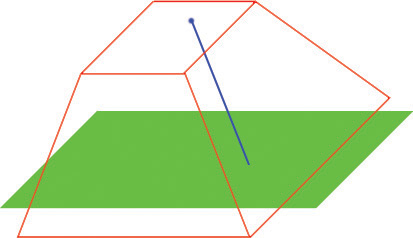
To get the mouse 3D coordinates based on the mouse 2D coordinates, you can use this function within your HUD class. The HUD class is required because the Deproject function is required.
function Vector GetMouseWorldLocation()
{
  local MouseInterfacePlayerInput MouseInterfacePlayerInput;
  local Vector2D MousePosition;
  local Vector MouseWorldOrigin, MouseWorldDirection, HitLocation, HitNormal;

  // Ensure that we have a valid canvas and player owner
  if (Canvas == None || PlayerOwner == None)
  {
    return Vect(0, 0, 0);
  }

  // Type cast to get the new player input
  MouseInterfacePlayerInput = MouseInterfacePlayerInput(PlayerOwner.PlayerInput);

  // Ensure that the player input is valid
  if (MouseInterfacePlayerInput == None)
  {
    return Vect(0, 0, 0);
  }

  // We stored the mouse position as an IntPoint, but it's needed as a Vector2D
  MousePosition.X = MouseInterfacePlayerInput.MousePosition.X;
  MousePosition.Y = MouseInterfacePlayerInput.MousePosition.Y;
  // Deproject the mouse position and store it in the cached vectors
  Canvas.DeProject(MousePosition, MouseWorldOrigin, MouseWorldDirection);

  // Perform a trace to get the actual mouse world location.
  Trace(HitLocation, HitNormal, MouseWorldOrigin + MouseWorldDirection * 65536.f, MouseWorldOrigin , true,,, TRACEFLAG_Bullet);
  return HitLocation;
}
Related topics
Adding the Kismet Mouse Input Event
class SeqEvent_MouseInput extends SequenceEvent;

var Vector HitLocation;
var Vector HitNormal;
var Vector MouseWorldOrigin;
var Vector MouseWorldDirection;

event Activated()
{
  local MouseInterfaceInteractionInterface MouseInteractionInterface;

  // Type cast the originator to ensure that it is a mouse interaction interface
  MouseInteractionInterface = MouseInterfaceInteractionInterface(Originator);

  if (MouseInteractionInterface != None)
  {
    // Get the appropriate values so we can push them out when the event is activated
    MouseWorldOrigin = MouseInteractionInterface.GetMouseWorldOrigin();
    MouseWorldDirection = MouseInteractionInterface.GetMouseWorldDirection();
    HitLocation = MouseInteractionInterface.GetHitLocation();
    HitNormal = MouseInteractionInterface.GetHitNormal();
  }
}

defaultproperties
{
  ObjName="Mouse Input"
  ObjCategory="Input"

  bPlayerOnly=false
  MaxTriggerCount=0

  OutputLinks(0)=(LinkDesc="Left Pressed")
  OutputLinks(1)=(LinkDesc="Left Released")
  OutputLinks(2)=(LinkDesc="Right Pressed")
  OutputLinks(3)=(LinkDesc="Right Released")
  OutputLinks(4)=(LinkDesc="Middle Pressed")
  OutputLinks(5)=(LinkDesc="Middle Released")
  OutputLinks(6)=(LinkDesc="Scroll Up")
  OutputLinks(7)=(LinkDesc="Scroll Down")
  OutputLinks(8)=(LinkDesc="Mouse Over")
  OutputLinks(9)=(LinkDesc="Mouse Out")

  VariableLinks(1)=(ExpectedType=class'SeqVar_Vector',LinkDesc="HitLocation",bWriteable=true,PropertyName=HitLocation)
  VariableLinks(2)=(ExpectedType=class'SeqVar_Vector',LinkDesc="HitNormal",bWriteable=true,PropertyName=HitNormal)
  VariableLinks(3)=(ExpectedType=class'SeqVar_Vector',LinkDesc="MouseWorldOrigin",bWriteable=true,PropertyName=MouseWorldOrigin)
  VariableLinks(4)=(ExpectedType=class'SeqVar_Vector',LinkDesc="MouseWorldDirection",bWriteable=true,PropertyName=MouseWorldDirection)
}
Related topics
Adding a subclassed KActor as an example
class MouseInterfaceKActor extends KActor
  Implements(MouseInterfaceInteractionInterface);

var Vector CachedMouseHitLocation;
var Vector CachedMouseHitNormal;
var Vector CachedMouseWorldOrigin;
var Vector CachedMouseWorldDirection;

// ===
// MouseInterfaceInteractionInterface implementation
// ===
function MouseLeftPressed(Vector MouseWorldOrigin, Vector MouseWorldDirection, Vector HitLocation, Vector HitNormal)
{
  CachedMouseWorldOrigin = MouseWorldOrigin;
  CachedMouseWorldDirection = MouseWorldDirection;
  CachedMouseHitLocation = HitLocation;
  CachedMouseHitNormal = HitNormal;
  TriggerEventClass(class'SeqEvent_MouseInput', Self, 0);
}

function MouseLeftReleased(Vector MouseWorldOrigin, Vector MouseWorldDirection)
{
  CachedMouseWorldOrigin = MouseWorldOrigin;
  CachedMouseWorldDirection = MouseWorldDirection;
  CachedMouseHitLocation = Vect(0.f, 0.f, 0.f);
  CachedMouseHitNormal = Vect(0.f, 0.f, 0.f);
  TriggerEventClass(class'SeqEvent_MouseInput', Self, 1);
}

function MouseRightPressed(Vector MouseWorldOrigin, Vector MouseWorldDirection, Vector HitLocation, Vector HitNormal)
{
  CachedMouseWorldOrigin = MouseWorldOrigin;
  CachedMouseWorldDirection = MouseWorldDirection;
  CachedMouseHitLocation = HitLocation;
  CachedMouseHitNormal = HitNormal;
  TriggerEventClass(class'SeqEvent_MouseInput', Self, 2);
}

function MouseRightReleased(Vector MouseWorldOrigin, Vector MouseWorldDirection)
{
  CachedMouseWorldOrigin = MouseWorldOrigin;
  CachedMouseWorldDirection = MouseWorldDirection;
  CachedMouseHitLocation = Vect(0.f, 0.f, 0.f);
  CachedMouseHitNormal = Vect(0.f, 0.f, 0.f);
  TriggerEventClass(class'SeqEvent_MouseInput', Self, 3);
}

function MouseMiddlePressed(Vector MouseWorldOrigin, Vector MouseWorldDirection, Vector HitLocation, Vector HitNormal)
{
  CachedMouseWorldOrigin = MouseWorldOrigin;
  CachedMouseWorldDirection = MouseWorldDirection;
  CachedMouseHitLocation = HitLocation;
  CachedMouseHitNormal = HitNormal;
  TriggerEventClass(class'SeqEvent_MouseInput', Self, 4);
}

function MouseMiddleReleased(Vector MouseWorldOrigin, Vector MouseWorldDirection)
{
  CachedMouseWorldOrigin = MouseWorldOrigin;
  CachedMouseWorldDirection = MouseWorldDirection;
  CachedMouseHitLocation = Vect(0.f, 0.f, 0.f);
  CachedMouseHitNormal = Vect(0.f, 0.f, 0.f);
  TriggerEventClass(class'SeqEvent_MouseInput', Self, 5);
}

function MouseScrollUp(Vector MouseWorldOrigin, Vector MouseWorldDirection)
{
  CachedMouseWorldOrigin = MouseWorldOrigin;
  CachedMouseWorldDirection = MouseWorldDirection;
  CachedMouseHitLocation = Vect(0.f, 0.f, 0.f);
  CachedMouseHitNormal = Vect(0.f, 0.f, 0.f);
  TriggerEventClass(class'SeqEvent_MouseInput', Self, 6);
}

function MouseScrollDown(Vector MouseWorldOrigin, Vector MouseWorldDirection)
{
  CachedMouseWorldOrigin = MouseWorldOrigin;
  CachedMouseWorldDirection = MouseWorldDirection;
  CachedMouseHitLocation = Vect(0.f, 0.f, 0.f);
  CachedMouseHitNormal = Vect(0.f, 0.f, 0.f);
  TriggerEventClass(class'SeqEvent_MouseInput', Self, 7);
}

function MouseOver(Vector MouseWorldOrigin, Vector MouseWorldDirection)
{
  CachedMouseWorldOrigin = MouseWorldOrigin;
  CachedMouseWorldDirection = MouseWorldDirection;
  CachedMouseHitLocation = Vect(0.f, 0.f, 0.f);
  CachedMouseHitNormal = Vect(0.f, 0.f, 0.f);
  TriggerEventClass(class'SeqEvent_MouseInput', Self, 8);
}

function MouseOut(Vector MouseWorldOrigin, Vector MouseWorldDirection)
{
  CachedMouseWorldOrigin = MouseWorldOrigin;
  CachedMouseWorldDirection = MouseWorldDirection;
  CachedMouseHitLocation = Vect(0.f, 0.f, 0.f);
  CachedMouseHitNormal = Vect(0.f, 0.f, 0.f);
  TriggerEventClass(class'SeqEvent_MouseInput', Self, 9);
}

function Vector GetHitLocation()
{
  return CachedMouseHitLocation;
}

function Vector GetHitNormal()
{
  return CachedMouseHitNormal;
}

function Vector GetMouseWorldOrigin()
{
  return CachedMouseWorldOrigin;
}

function Vector GetMouseWorldDirection()
{
  return CachedMouseWorldDirection;
}

defaultproperties
{
  SupportedEvents(4)=class'SeqEvent_MouseInput'
}
- When any of the interface implementation functions are executed via the HUD, we trigger the attached Mouse Input Kismet node. The number at end of the trigger call is the output index.
Using the Kismet Mouse Input Event
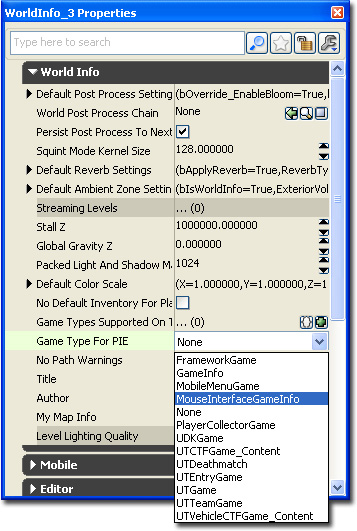 Expand the "Lightmass" tab and uncheck the "Use Global Illumination" check box. There is no need to use light mass for the test map.
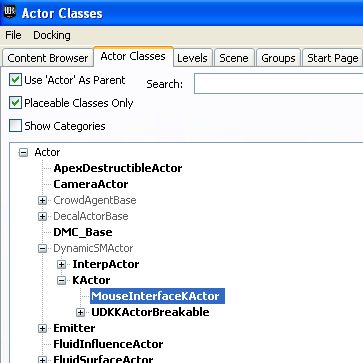
 Open up the "Content Browser" and select the "Actor Classes" tab. From there expand the class tree select the "MouseInterfaceKActor". This is so that when you open up the context menu within the world viewport, it will allow you to add it within the world.
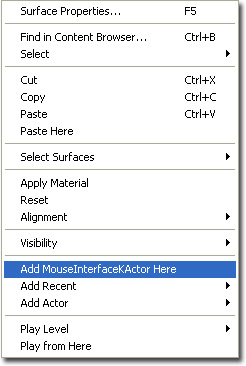
 Right click within the world viewport to open the viewport context menu. Select and click "Add MouseInterfaceKActor Here" to add a MouseInterfaceKActor.
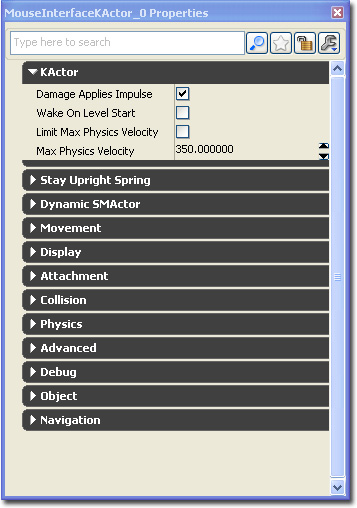
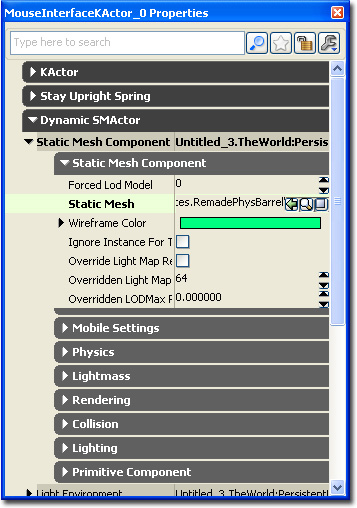
 Because the MouseInterfaceKActor doesn't have a visible static mesh, it will first appear as the selected transform widget (selection, movement, rotation or scaling widget). Press F4 to open up the actors property window. Click on the padlock icon at the top to set the selection.
 Find an interesting static mesh within the "Content Browser". Select it within the "Content Browser".
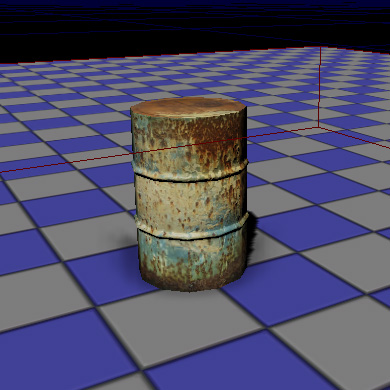
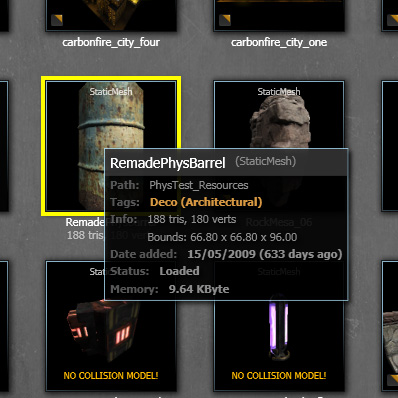 Expand the "Dynamic SMActor" tab, expand the "Static Mesh Component" object, then lastly the "Static Mesh Component" tab. Press the green arrow next to the "Static Mesh" field. This will set the static mesh you've selected in the "Content Browser". You should see the barrel appear within the world viewport.
 Add the necessary lighting within the level and compile the level.
 Open up the Kismet window by pressing
  within the Editor toolbar.
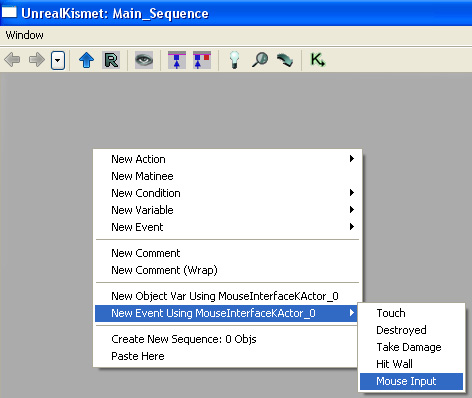
With the MouseInterfaceKActor still selected within the world viewport, right click within the empty space within the Kismet window to bring up a context menu. Add our new Mouse Input Event. This method ensures that our event is attached to the MouseInterfaceKActor that is in the world.
within the Editor toolbar.
With the MouseInterfaceKActor still selected within the world viewport, right click within the empty space within the Kismet window to bring up a context menu. Add our new Mouse Input Event. This method ensures that our event is attached to the MouseInterfaceKActor that is in the world.
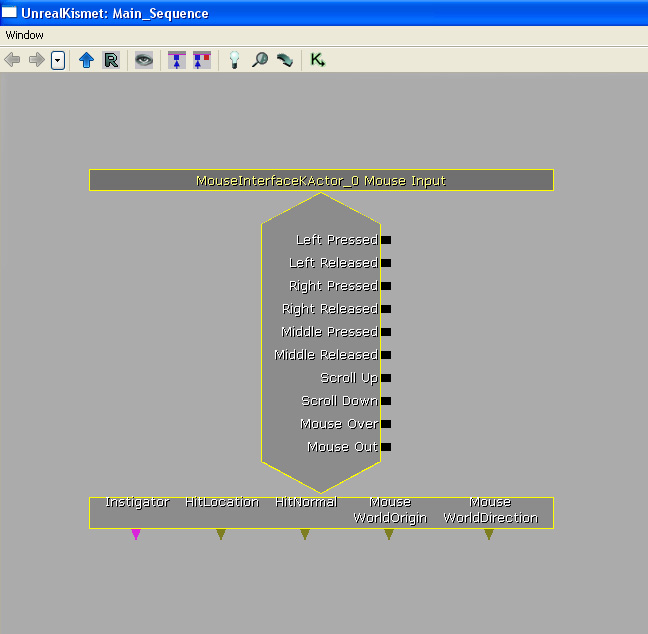
 This is our Mouse Input event. As you can see, all of the output links refer to the mouse input types that may occur. The event also outputs various variables that we can also use.
 To test our Mouse Input event, let's create a few log actions.
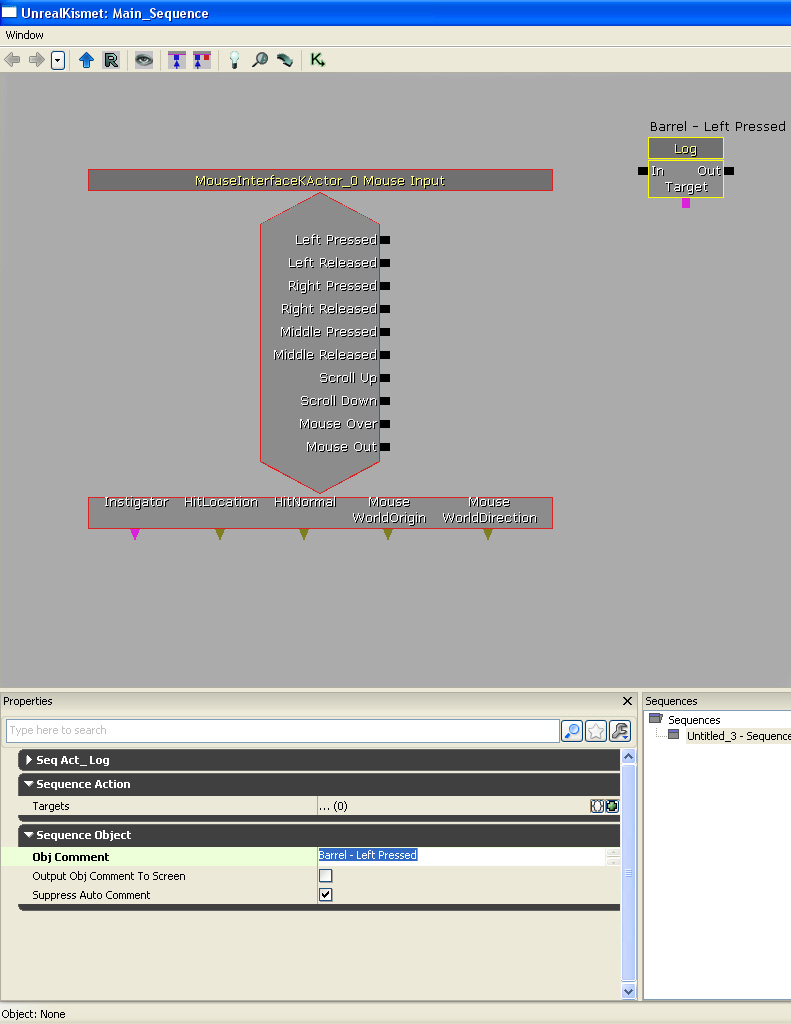
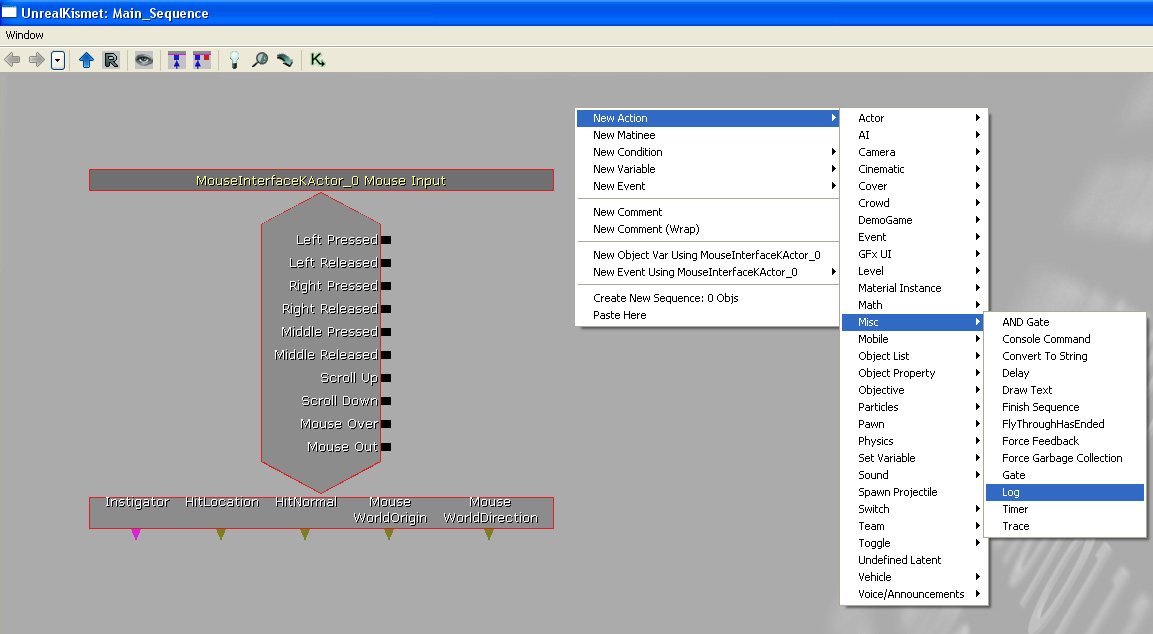 Set the log action to output some text that is appropriate for the event output we want to test.
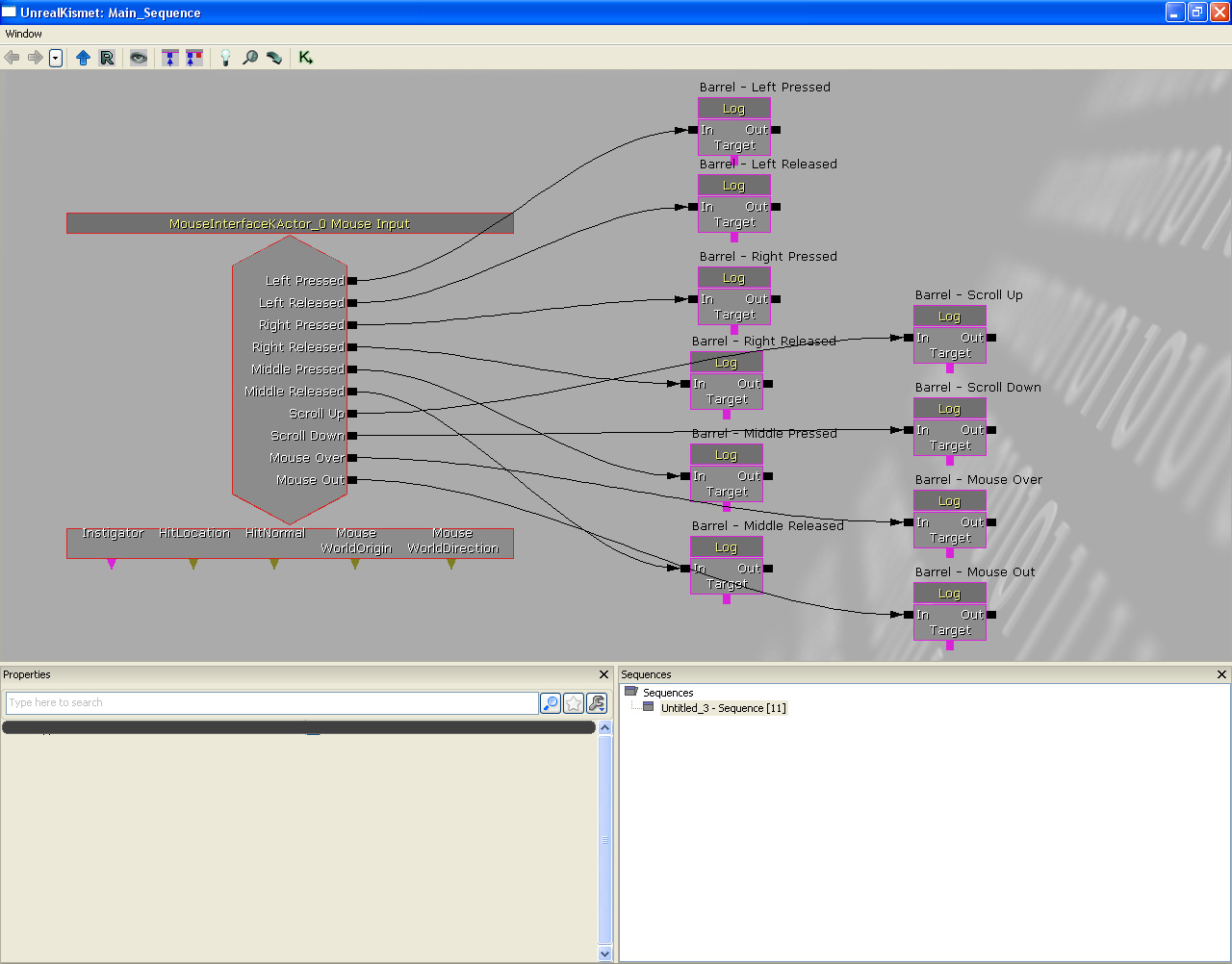
 Create more log actions to test all of the event outputs. Connect them all up appropriately.
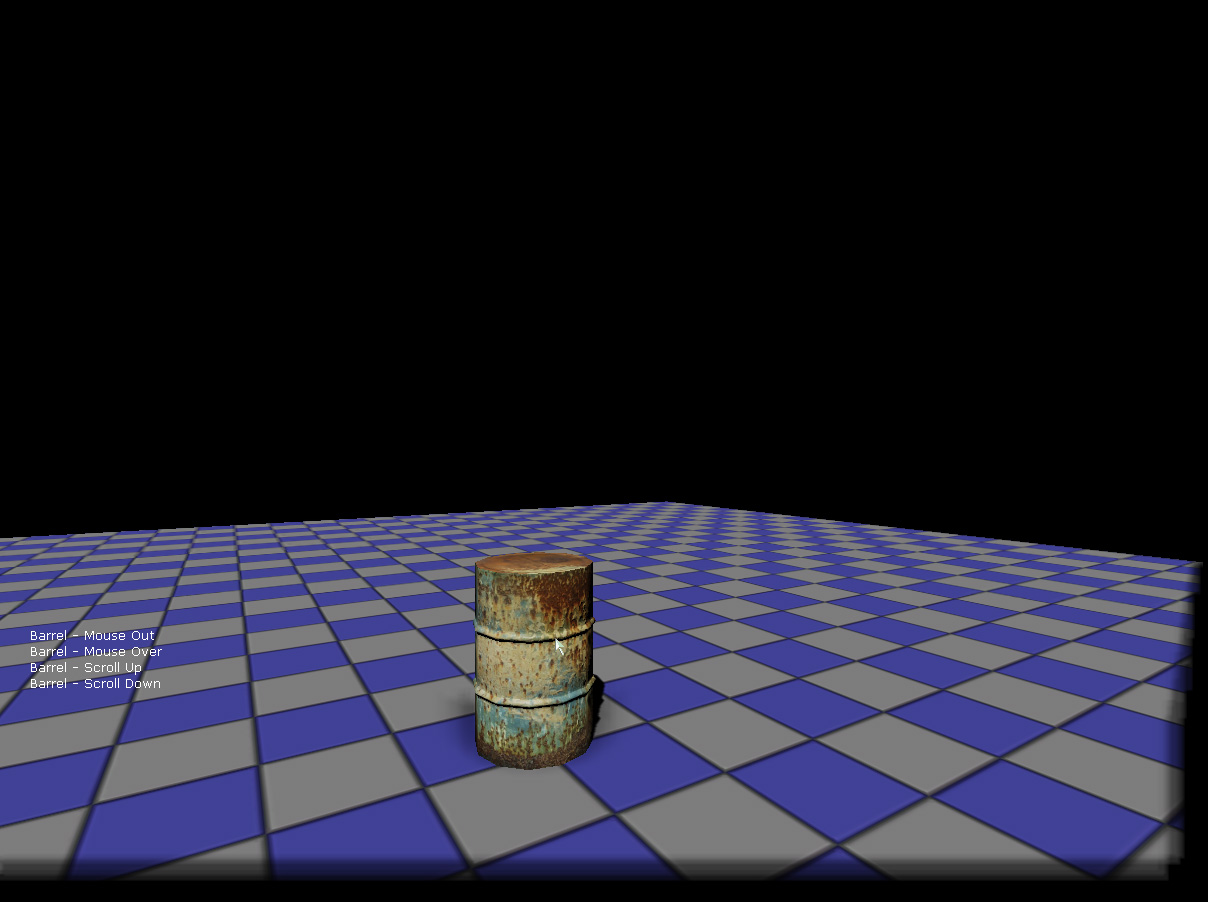
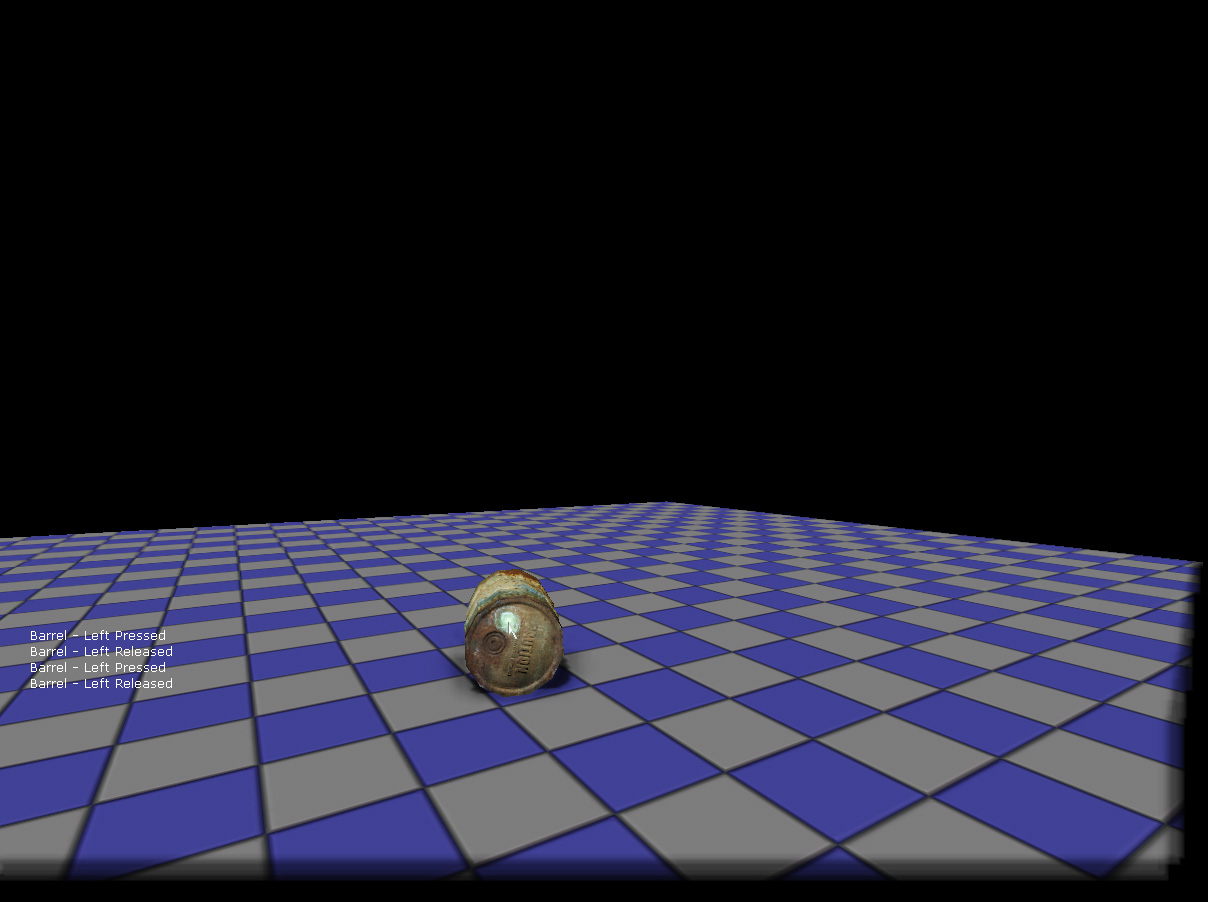
 Run the level within PIE and you should be able to test the mouse input Kismet interface. Remember that the mouse buttons and scrolling are only responsive when the mouse is over the MouseInterfaceKActor.
 Let's expand this example by creating a sequence which allows us to shoot at the MouseInterfaceKActor. Start by creating a new vector variable. This is so that we can store the mouse origin and the mouse hit location.
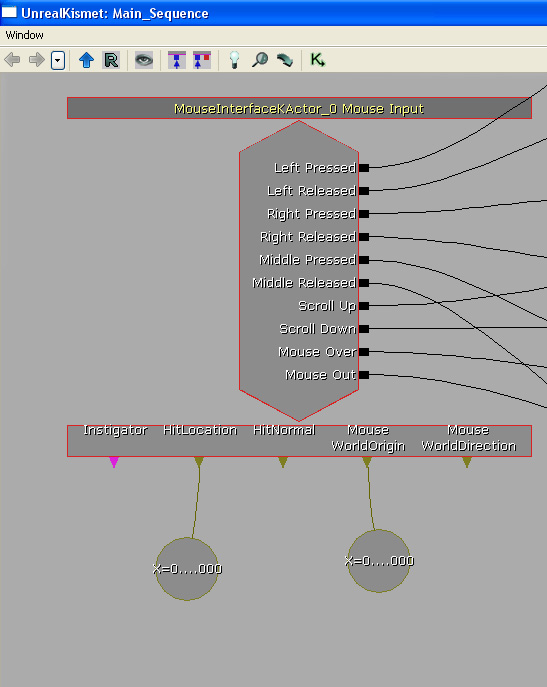
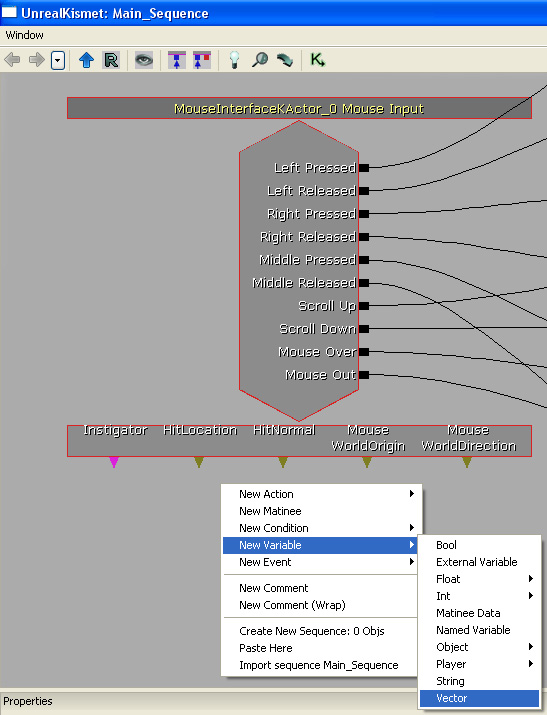 Bind the vector variables to the event's variable outputs, "HitLocation" and "Mouse WorldOrigin".
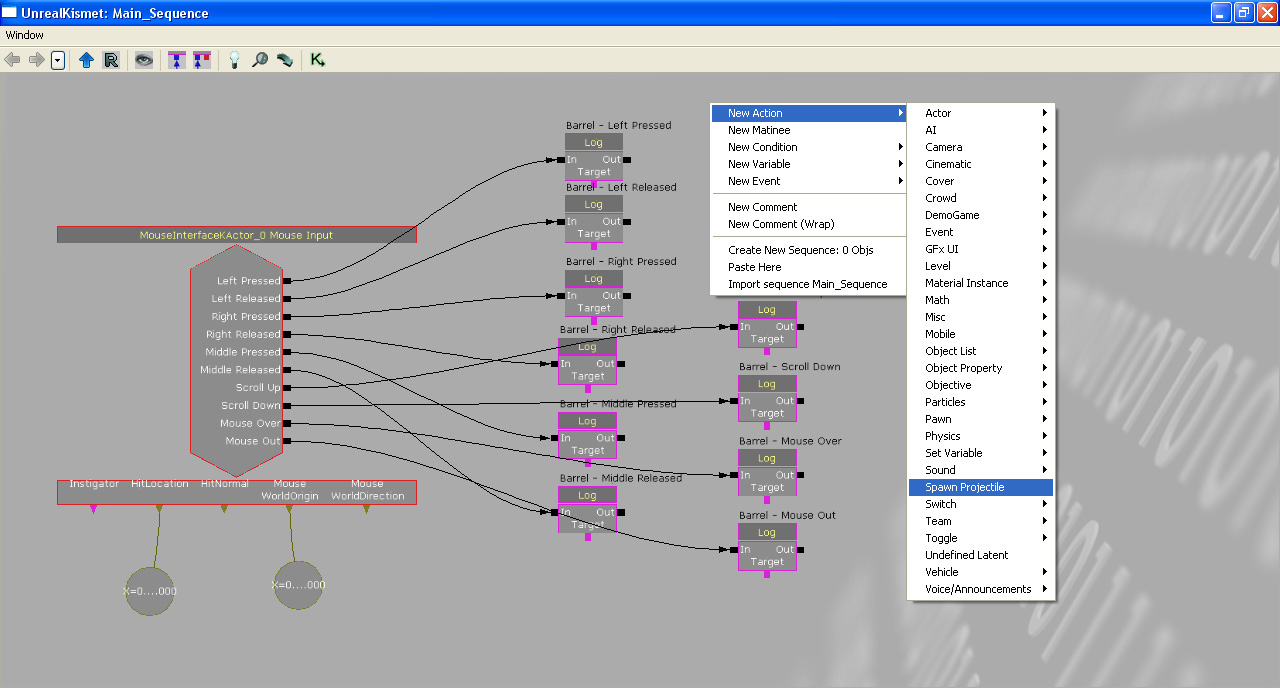
 Add a new "Spawn Projectile" action. This creates a projectile when the action is executed.
 This is the newly created "Spawn Projectile" action.
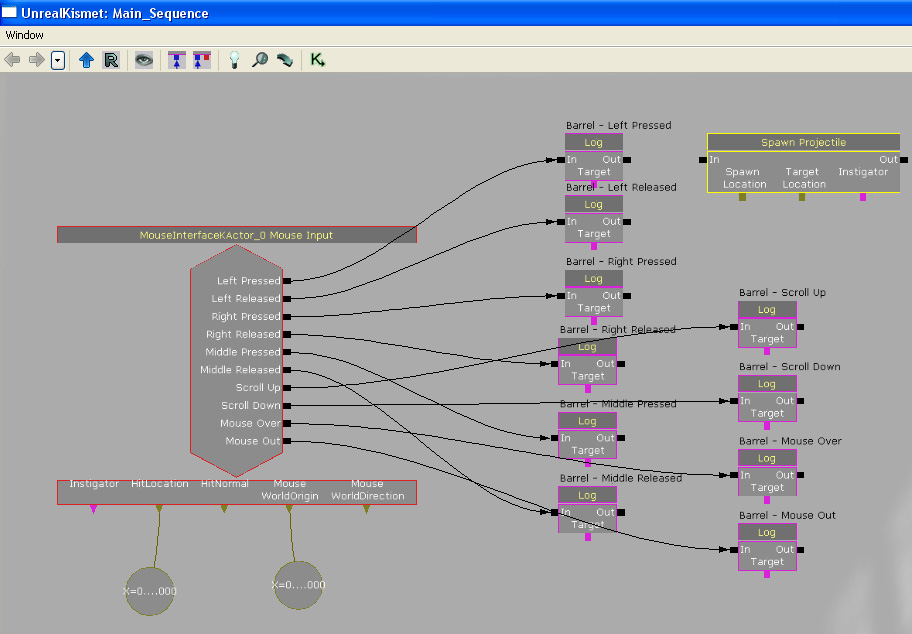 Connect the "Spawn Projectile" action to the "Log" action which is activated when the left mouse button is pressed. Connect the "Mouse WorldOrigin" variable to the "Spawn Location" input on the "Spawn Projectile" event. Connect the "HitLocation" variable to the "Target Location" input on the "Spawn Projectile" event. This will cause the "Spawn Projectile" to spawn a projectile at the mouse world origin location that will travel towards the mouse hit location. Thus making it look like that we are shooting at the MouseInterfaceKActor in the world.
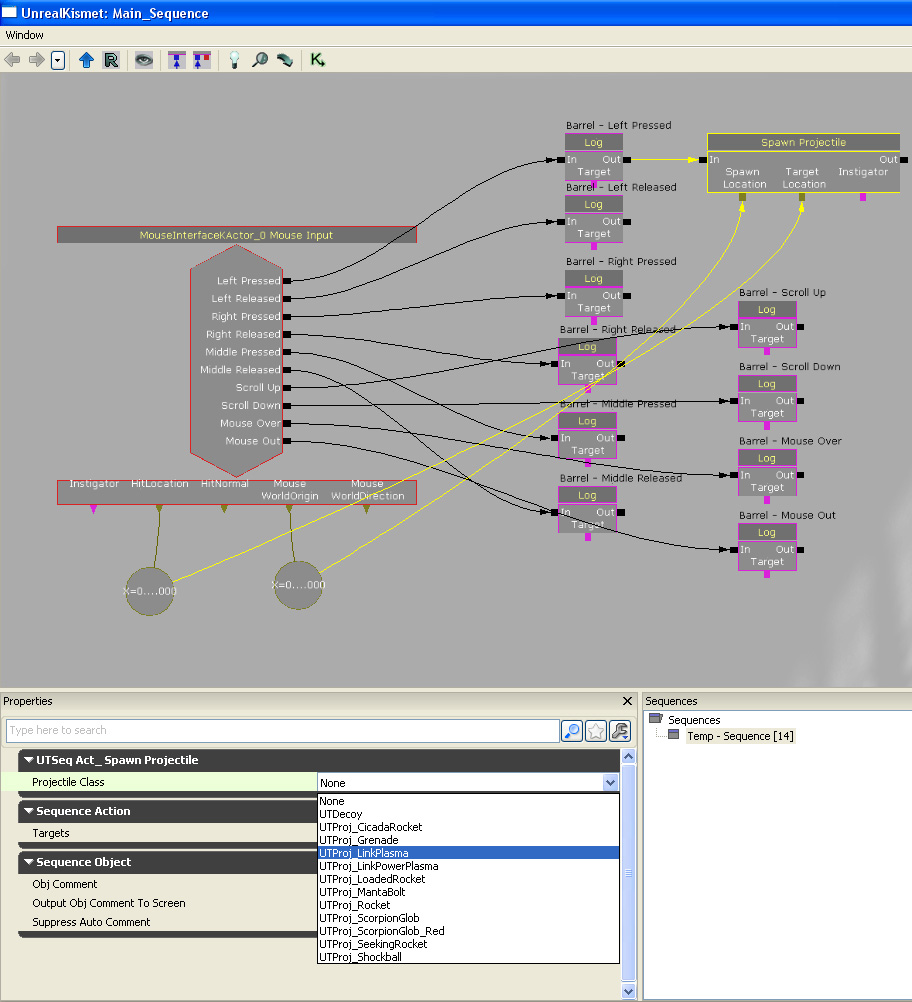
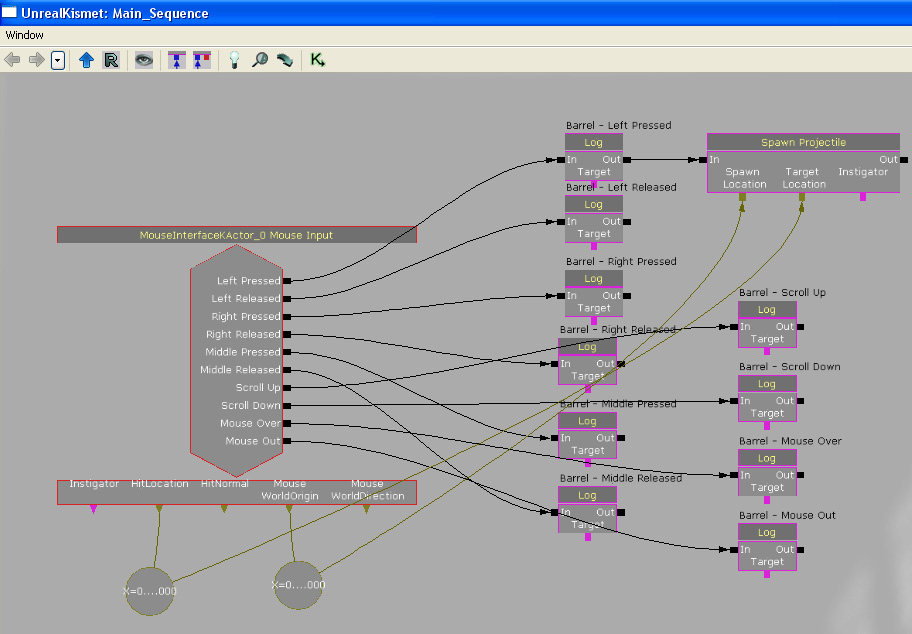 Set what kind of projectile to spawn.
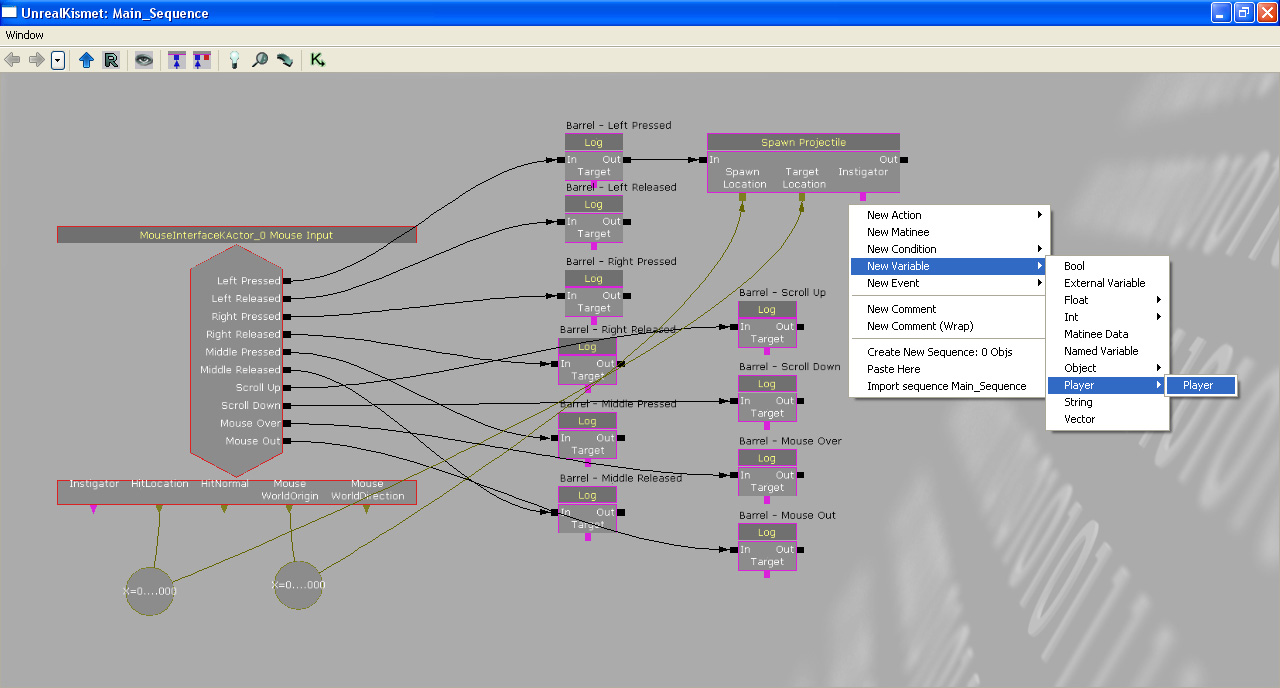
 Add an "All Players" variable. This is a required input of the "Spawn Projectile" action.
 Here is the newly created "All Players" variable.
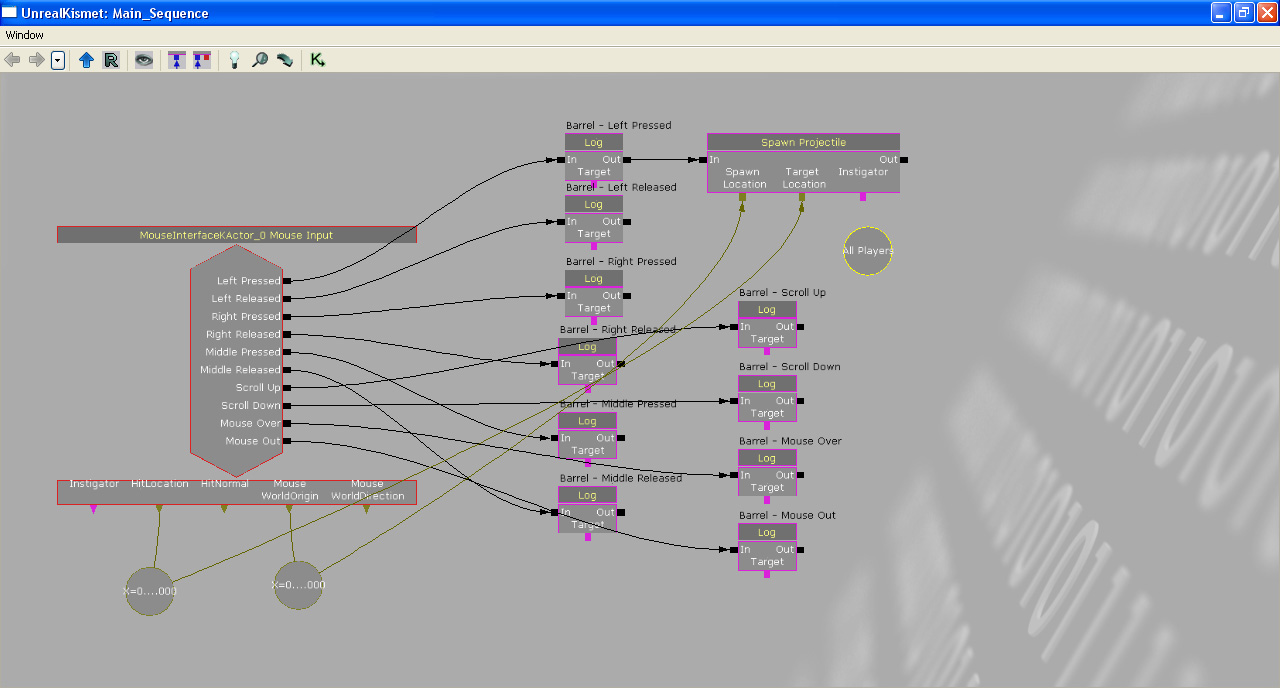 Connect the "All Players" variable to the "Spawn Projectile".
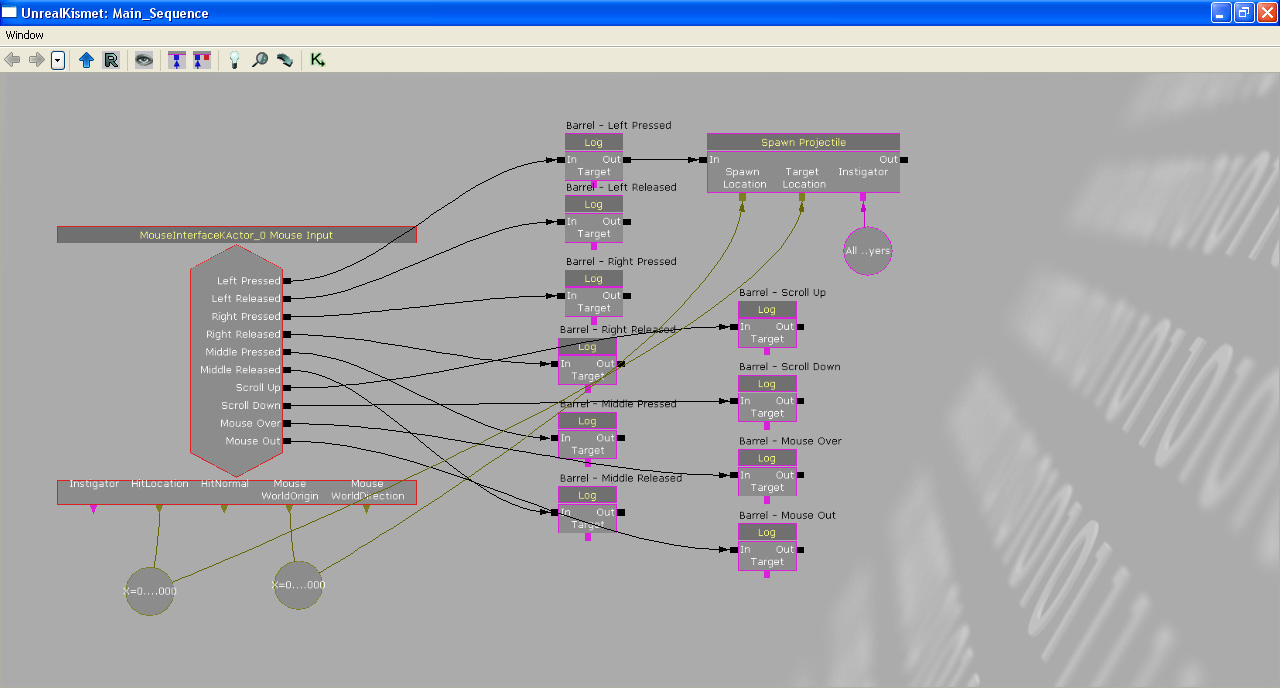 Run PIE and test the Kismet. You should now be able to fire at the MouseInterfaceKActor.
Related topics
Downloads
- Download the content used in this gem. (MouseInterface.zip)